Showing posts with label XACML. Show all posts
Showing posts with label XACML. Show all posts
Claim based authorization with WSO2 Identity Server
1. Download WSO2 Identity Server latest version from here.
2. The default user store of WSO2 Identity Server is running on an embedded ApacheDS server. In case you need to point it to an external LDAP server you can do it through a change in the configuration. This blog post explains how to integrate Oracle Directory Server as the User Store of WSO2 Identity Server.
3. Start the WSO2 Identity Server from [IS_HOME]\bin
4. Let's now define our authorization policy in plain English.
"A given resource can be accessed only by any user having an email address from wso2 belonging to a particular role and all the requests to any other resource other than this should fail"
5. Save the following policy in to a local file and import the file to WSO2 Identity Server XACML engine. Main --> Entitlement --> Administration --> Import New Entitlement Policy --> File System and import the policy. Then from policy list view click on the Enable button against the uploaded policy to enable the policy.
6. Looking at the policy, you might have noticed that, I have used the claim http://wso2.org/claims/emailaddress. And, this should map to the attribute id, corresponding to the email, in the underlying user store. If it is LDAP then, http://wso2.org/claims/emailaddress should map to the 'mail' attribute id. This is done through the Claim Management UI,read @wso2.com$ admin http://localhost:8080/services/echo/
7. Configure --> Claim Management --> http://wso2.org/claims
8. Now you can see all the claims used under wso2.org dialect
9. Click on Edit link against any of the claims you want to update and then set the "Mapped Attribute" value to the, attribute id name from the underlying user store.
10. You can try the policy we defined, from the Entitlement TryIt tool. Main --> Entitlement --> TryIt.

Integrating 3-legged OAuth with XACML
You need to download following products to get the sample running.
1. WSO2 Identity Server - acting as the service provider, where a user can register an OAuth consumer app to obtain a request token, authorize it and obtain an access token. Also WSO2 Identity Server is used as the XACML engine. Identity Server can be downloaded from here.
2. WSO2 ESB - acting as an interceptor to the final resource the consumer wants to access. ESB will intercept the request and performs OAuth validation. WSO2 ESB can be downloaded from here.
3. WSO2 Application Server - this is used to host WSO2 OAuth Playground web app. App Server can be downloaded from here.
4. Download and unzip the sample from here to OAUTH_SAMPLE.
Let's first start by setting up the WSO2 Identity Server.
1. Unzip the downloaded copy of Identity Server and remove all jars starting with org.wso2.carbon.identity.oauth inside [IS_HOME]\reposiroty\components\plugins
2. Copy following jars from OAUTH_SAMPLE\dropins to [IS_HOME]\reposiroty\components\dropins
org.wso2.carbon.identity.oauth-3.2.1.jar
org.wso2.carbon.identity.oauth.stub-3.2.1.jar
org.wso2.carbon.identity.oauth.ui-3.2.1.jar
3. Above [1] & [2] steps are not required when OAuth 3.2.1 feature is available in WSO2 feature repo - you can simply point there and update.
4. Start WSO2 Identity Server
5. Login as admin/admin and go to OAuth and register a consumer application. When creating the application make sure you give http://localhost:9767/playground/oauth/oauth_callback as the callback url. This is the location we are going to setup our sample web app later.
6. Also - once created the app - click on the link under you application name - there you can see the corresponding consumer key and the consumer secret for your app.
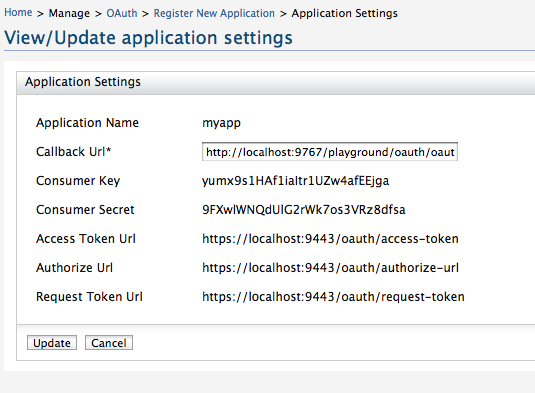
7. Now we need to setup the XACML engine in WSO2 Identity Server
9. Go to Entitlement --> Administration --> Import Policy --> Select file system and import the policy OAUTH_SAMPLE/xacml.policy
10. Once imported - make sure you click on the ENABLE link against the imported policy.
11. That completes the Identity Server setup.
Now, let's setup WSO2 ESB.
1. Unzip the downloaded copy of WSO2 ESB and remove all jars starting with org.wso2.carbon.identity.oauth inside [ESB_HOME]\reposiroty\components\plugins
2. Copy following jars from OAUTH_SAMPLE\dropins to [ESB_HOME]\reposiroty\components\dropins
org.wso2.carbon.identity.oauth.mediator-3.2.1.jar
org.wso2.carbon.identity.oauth.stub-3.2.1.jar
3. Above [1] & [2] steps are not required when OAuth 3.2.1 feature is available in WSO2 feature repo - you can simply point there and update.
4. Open ESB_HOME\repository\conf\carbon.xml and find for the element Offset and set it to 2.
This will make sure that ESB starts on ports 9445/9765.
5. Start WSO2 ESB
6. Login as admin/admin and replace the synapse configuration in the source view - with the content from OAUTH_SAMPLE\synapse.xml
7. That's it and we are done with the ESB.
Let's set up the sample web app with WSO2 Application Server.
1. Open AS_HOME\repository\conf\carbon.xml and find for the element Offset and set it to 4.
This will make sure that App Server starts on ports 9447/9767.
2. Copy OAUTH_SAMPLE\playground.war to AS_HOME\repository\deployment\server\webapps
3. Start WSO2 Application Server
Now let's see how web app works.
1. Go to http://localhost:9767/playground
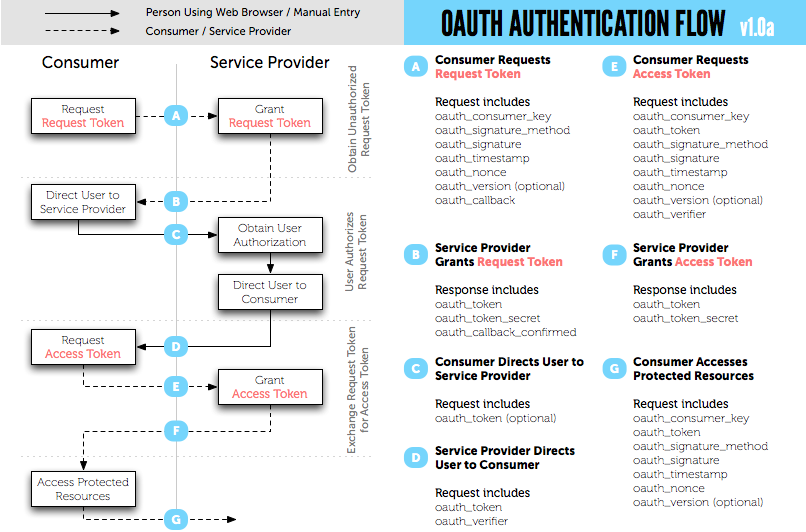
2. To get the request token, type your consumer key and consumer secret corresponding to your registered oauth application. Set the scope as echoService [should be the exact name, since that is what is been referred in the XACML policy].
3. Once you get the request token, you need to get that authorized by the user.
4. After that you can exchange the authorized token to an access token.
5. Copy the value of oauth_token from the response to [4] - we need this value when we are going to access the resource.
Now let's try to invoke a service with the obtained access token. Following java code explains how to do that. You need replace the values of CONSUMER_SECRET,CONSUMER_KEY and OAUTH_TOKEN. The value of OAUTH_TOKEN is the one you got with the access token.
package org.wso2.rest.security.oauth;

import java.io.BufferedReader;
import java.io.IOException;
import java.io.InputStream;
import java.io.InputStreamReader;
import java.net.URL;

import com.google.gdata.client.GoogleService;
import com.google.gdata.client.Service.GDataRequest;
import com.google.gdata.client.authn.oauth.GoogleOAuthParameters;
import com.google.gdata.client.authn.oauth.OAuthHmacSha1Signer;

public class OauthClient {

 private static final String ESB = "http://127.0.0.1:8282/";

 /**
  * @param args
  */
 public static void main(String[] args) {

  final String CONSUMER_SECRET = "9FXwlWNQdUlG2rWk7os3VRz8dfsa";
  final String CONSUMER_KEY = "yumx9s1HAf1iaItr1UZw4afEEjga";
  final String OAUTH_TOKEN = "hfiYq1ppu3VhLsFWxpFjCUDc3Jwa";

  GDataRequest request = null;

  try {

   GoogleOAuthParameters oauthParameters = new GoogleOAuthParameters();
   oauthParameters.setOAuthConsumerKey(CONSUMER_KEY);
   oauthParameters.setOAuthConsumerSecret(CONSUMER_SECRET);
   oauthParameters.setOAuthToken(OAUTH_TOKEN);

   OAuthHmacSha1Signer signer = new OAuthHmacSha1Signer();
   GoogleService service = new GoogleService("demoservice", "myapp");
   service.setOAuthCredentials(oauthParameters, signer);
   String param = "hi";
   String baseString = ESB + "services/oauth_proxy/echoString" + "?xoauth_requestor_id="
     + CONSUMER_KEY + "&in=" + param + "&scope=echoService";
   URL feedUrl = new URL(baseString);
   request = service.createFeedRequest(feedUrl);
   request.execute();
   System.out.println(convertStreamToString(request.getResponseStream()));
  } catch (Exception e) {
   e.printStackTrace();
  }
 }

 private static String convertStreamToString(InputStream is) throws IOException {
  if (is != null) {
   StringBuilder sb = new StringBuilder();
   String line;
   try {
    BufferedReader reader = new BufferedReader(new InputStreamReader(is, "UTF-8"));
    while ((line = reader.readLine()) != null) {
     sb.append(line).append("\n");
    }
   } finally {
    is.close();
   }
   return sb.toString();
  } else {
   return "";
  }
 }

}
To run the above client you need to have google-collect and gdata-core jars in your classpath.
XACML Policy Information Point Extensions & Designators with WSO2 Identity Server 3.2.0
1.PIP Extensions
Once the PIP Extensions got registered with the system - the registered PIP Extension will be invoked for each and every XACML request the PDP receives and this happens before the request been evaluated.
PIP Extensions can be used to modify the incoming request as well as log relavent parameters.

2.PIP Desiginators.
Once the PIP Desiginators got registered with the system - the registered Desiginators will be invoked while a request been evaluated in the PDP and need to find out the value of an attribute which is supported by the Desiginator. The Desiginator will let the system know the attributes it supports at the time of registration.

To register a PIP Extension or a PIP Designator we need to copy the jars with those classes to [CARBON_HOME]\repository\components\lib and create a file called pip-config.xml inside [CARBON_HOME]\repository\conf with the following. Here I assume the PIP Extension class name is org.wso2.carbon.identity.sample.pip.SamplePIPExtension and PIP Designator class name is org.wso2.carbon.identity.sample.pip.SamplePIPDesignator.
<PIPConfig>
 <AttributeDesignators>
  <Designator class="org.wso2.carbon.identity.entitlement.pip.DefaultAttributeFinder" />
  <Designator class="org.wso2.carbon.identity.sample.pip.SamplePIPDesignator" />
 </AttributeDesignators>
 <Extensions>
     <Extension class="org.wso2.carbon.identity.sample.pip.SamplePIPExtension" />
 </Extensions>
</PIPConfig>
Also, in the above file, make sure that you keep the entry <Designator class="org.wso2.carbon.identity.entitlement.pip.DefaultAttributeFinder" /> as it is, because it's the default PIP Designator which will by default talk to the underlying user store.Now, let's see how to write PIP Extensions and Designators. You need to have org.wso2.carbon.identity.entitlement-3.2.0.jar and sun-xacml-2.0.1.wso2v1.jar in the classpath. [You can find those jars inside [IS_HOME]\repository\components\plugins
package org.wso2.carbon.identity.sample.pip;

import java.util.HashSet;
import java.util.Set;

import org.wso2.carbon.identity.entitlement.pip.PIPAttributeFinder;

public class SamplePIPDesignator implements PIPAttributeFinder {

 @Override
 public Set getAttributeValues(String subjectId, String resourceId,
   String attributeId) throws Exception {
  Set attributeValues = new HashSet();
  attributeValues.add("myName");

  System.out.println("SamplePIPDesignator Called");
  System.out.println("SamplePIPDesignator SubjectId " + subjectId);
  System.out.println("SamplePIPDesignator AttributeId " + attributeId);
  System.out.println("SamplePIPDesignator Resource Id " + resourceId);

  return attributeValues;
 }

 @Override
 public Set getSupportedAttributes() {
  Set attributes = new HashSet();
  attributes.add("http://wso2.org/sample/claims/name");
  return attributes;
 }

}
package org.wso2.carbon.identity.sample.pip;

import org.wso2.carbon.identity.entitlement.pip.PIPExtension;

import com.sun.xacml.ctx.RequestCtx;

public class SamplePIPExtension implements PIPExtension{

 @Override
 public void update(RequestCtx request) {
  System.out.println("SamplePIPExtension Called");
 }

}
Notes :1. The latest WSO2 Identity Server is running with the embedded ApacheDS LDAP server. The default port is 10389. If you want to change it, open CARBON_HOME\repository\conf\carbon.xml and look for LDAPServerPort and change it.
2. When you create or import a XACML policy to the Identity Server - policy will be in Disabled state - you need to Enable it by clicking the Enable link against the policy in the policy list page.
.NET Client / Web App - Authorization with WSO2 Identity Server, XACML Engine
2. Start the Identity Server and go to https://localhost:9443/carbon - then go to Policies --> Entitlement and add a new XACML Policy - then replace the default one with the one below.
The XACML policy below addresses following authorization requirements.
- The operation getVesrion1 and getVersion2 in the service /services/Customers should be accessed by any user
- Request to any other service or operation should only be accessed by the users belong to the group(s) admin_emps or admin or both
<?xml version="1.0" encoding="UTF-8"?>
<Policy PolicyId="urn:sample:xacml:2.0:samplepolicy"
  RuleCombiningAlgId="urn:oasis:names:tc:xacml:1.0:rule-combining-algorithm:first-applicable" xmlns="urn:oasis:names:tc:xacml:2.0:policy:schema:os">
  <Description>Sample XACML Authorization Policy</Description>
  <Target>
    <Subjects>
      <AnySubject/>
    </Subjects>
    <Actions>
      <AnyAction/>
    </Actions>
    <Resources>
      <AnyResource/>
    </Resources>
  </Target>
  <Rule Effect="Permit" RuleId="primary-resource-rule">
    <Target>
      <Subjects>
        <AnySubject/>
      </Subjects>
      <Resources>
        <ResourceMatch MatchId="urn:oasis:names:tc:xacml:1.0:function:string-at-least-one-member-of">
          <ResourceAttributeDesignator
            AttributeId="urn:oasis:names:tc:xacml:1.0:resource:resource-id" DataType="http://www.w3.org/2001/XMLSchema#string"/>
          <Apply FunctionId="urn:oasis:names:tc:xacml:1.0:function:string-bag">
            <AttributeValue DataType="http://www.w3.org/2001/XMLSchema#string">/services/Customers/getVersion1</AttributeValue>
            <AttributeValue DataType="http://www.w3.org/2001/XMLSchema#string">/services/Customers/getVersion2</AttributeValue>
          </Apply>
        </ResourceMatch>
      </Resources>
      <Actions>
        <AnyAction/>
      </Actions>
    </Target>
    <Condition>
      <Apply FunctionId="urn:oasis:names:tc:xacml:1.0:function:string-at-least-one-member-of">
        <ResourceAttributeDesignator
          AttributeId="urn:oasis:names:tc:xacml:1.0:resource:resource-id" DataType="http://www.w3.org/2001/XMLSchema#string"/>
        <Apply FunctionId="urn:oasis:names:tc:xacml:1.0:function:string-bag">
          <AttributeValue DataType="http://www.w3.org/2001/XMLSchema#string">/services/Customers/getVersion1</AttributeValue>
          <AttributeValue DataType="http://www.w3.org/2001/XMLSchema#string">/services/Customers/getVersion2</AttributeValue>
        </Apply>
      </Apply>
    </Condition>
  </Rule>
  <Rule Effect="Permit" RuleId="primary-group-emps-rule">
    <Target>
      <Subjects>
        <AnySubject/>
      </Subjects>
      <Resources>
        <Resource>
          <ResourceMatch MatchId="urn:oasis:names:tc:xacml:1.0:function:string-regexp-match">
            <AttributeValue DataType="http://www.w3.org/2001/XMLSchema#string">/services/Customers/</AttributeValue>
            <ResourceAttributeDesignator
              AttributeId="urn:oasis:names:tc:xacml:1.0:resource:resource-id" DataType="http://www.w3.org/2001/XMLSchema#string"/>
          </ResourceMatch>
        </Resource>
      </Resources>
      <Actions>
        <Action>
          <ActionMatch MatchId="urn:oasis:names:tc:xacml:1.0:function:string-equal">
            <AttributeValue DataType="http://www.w3.org/2001/XMLSchema#string">read</AttributeValue>
            <ActionAttributeDesignator
              AttributeId="urn:oasis:names:tc:xacml:1.0:action:action-id" DataType="http://www.w3.org/2001/XMLSchema#string"/>
          </ActionMatch>
        </Action>
      </Actions>
    </Target>
    <Condition>
      <Apply FunctionId="urn:oasis:names:tc:xacml:1.0:function:string-at-least-one-member-of">
        <SubjectAttributeDesignator AttributeId="group" DataType="http://www.w3.org/2001/XMLSchema#string"/>
        <Apply FunctionId="urn:oasis:names:tc:xacml:1.0:function:string-bag">
          <AttributeValue DataType="http://www.w3.org/2001/XMLSchema#string">admin_emps</AttributeValue>
          <AttributeValue DataType="http://www.w3.org/2001/XMLSchema#string">admin</AttributeValue>
        </Apply>
      </Apply>
    </Condition>
  </Rule>
  <Rule Effect="Deny" RuleId="deny-rule"/>
</Policy>
3. Download the .NET client from hear - unzip it - edit the app.config to point to correct EPRs where your Identity Server [XACML engine] is running.
4. You can parse the XML response returned from the XACMl engine to get the decision.
Guide to write XACML policies in WSO2 Identity Server - Part - 7
This post addresses following authorization requirements.
1. The operation getVesrion1 and getVersion2 in the service http://localhost:8280/services/Customers should be accessed by any user
2. Request to any other service or operation should only be accessed by the users belong to the group(s) admin_emps or admin or both
<Policy PolicyId="urn:sample:xacml:2.0:samplepolicy"
  RuleCombiningAlgId="urn:oasis:names:tc:xacml:1.0:rule-combining-algorithm:first-applicable" xmlns="urn:oasis:names:tc:xacml:2.0:policy:schema:os">
  <Description>Sample XACML Authorization Policy</Description>
  <Target>
    <Subjects>
      <AnySubject/>
    </Subjects>
    <Actions>
      <AnyAction/>
    </Actions>
    <Resources>
      <AnyResource/>
    </Resources>
  </Target>
  <Rule Effect="Permit" RuleId="primary-resource-rule">
    <Target>
      <Subjects>
        <AnySubject/>
      </Subjects>
      <Resources>
        <ResourceMatch MatchId="urn:oasis:names:tc:xacml:1.0:function:string-at-least-one-member-of">
          <ResourceAttributeDesignator
            AttributeId="urn:oasis:names:tc:xacml:1.0:resource:resource-id" DataType="http://www.w3.org/2001/XMLSchema#string"/>
          <Apply FunctionId="urn:oasis:names:tc:xacml:1.0:function:string-bag">
            <AttributeValue DataType="http://www.w3.org/2001/XMLSchema#string">http://localhost:8280/services/Customers/getVersion1</AttributeValue>
            <AttributeValue DataType="http://www.w3.org/2001/XMLSchema#string">http://localhost:8280/services/Customers/getVersion2</AttributeValue>
          </Apply>
        </ResourceMatch>
      </Resources>
      <Actions>
        <AnyAction/>
      </Actions>
    </Target>
    <Condition>
      <Apply FunctionId="urn:oasis:names:tc:xacml:1.0:function:string-at-least-one-member-of">
        <ResourceAttributeDesignator
          AttributeId="urn:oasis:names:tc:xacml:1.0:resource:resource-id" DataType="http://www.w3.org/2001/XMLSchema#string"/>
        <Apply FunctionId="urn:oasis:names:tc:xacml:1.0:function:string-bag">
          <AttributeValue DataType="http://www.w3.org/2001/XMLSchema#string">http://localhost:8280/services/Customers/getVersion1</AttributeValue>
          <AttributeValue DataType="http://www.w3.org/2001/XMLSchema#string">http://localhost:8280/services/Customers/getVersion2</AttributeValue>
        </Apply>
      </Apply>
    </Condition>
  </Rule>
  <Rule Effect="Permit" RuleId="primary-group-emps-rule">
    <Target>
      <Subjects>
        <AnySubject/>
      </Subjects>
      <Resources>
          <AnyResource/>
      </Resources>
      <Actions>
        <Action>
          <ActionMatch MatchId="urn:oasis:names:tc:xacml:1.0:function:string-equal">
            <AttributeValue DataType="http://www.w3.org/2001/XMLSchema#string">read</AttributeValue>
            <ActionAttributeDesignator
              AttributeId="urn:oasis:names:tc:xacml:1.0:action:action-id" DataType="http://www.w3.org/2001/XMLSchema#string"/>
          </ActionMatch>
        </Action>
      </Actions>
    </Target>
    <Condition>
      <Apply FunctionId="urn:oasis:names:tc:xacml:1.0:function:string-at-least-one-member-of">
        <SubjectAttributeDesignator AttributeId="group" DataType="http://www.w3.org/2001/XMLSchema#string"/>
        <Apply FunctionId="urn:oasis:names:tc:xacml:1.0:function:string-bag">
          <AttributeValue DataType="http://www.w3.org/2001/XMLSchema#string">admin_emps</AttributeValue>
          <AttributeValue DataType="http://www.w3.org/2001/XMLSchema#string">admin</AttributeValue>
        </Apply>
      </Apply>
    </Condition>
  </Rule>
  <Rule Effect="Deny" RuleId="deny-rule"/>
</Policy>
Guide to write XACML policies in WSO2 Identity Server - Part - 6
This post addresses following authorization requirements.
1. The operation getEmployees in the service http://localhost:8280/services/Customers should only be accessed by the users belong to the group(s) admin_emps or admin or both
2. Request to any other service or operation should fail
3. But the users admin1 and admin2 should be able to access any resource irrespective of their role
<?xml version="1.0" encoding="UTF-8"?>
<Policy PolicyId="urn:sample:xacml:2.0:samplepolicy"
  RuleCombiningAlgId="urn:oasis:names:tc:xacml:1.0:rule-combining-algorithm:first-applicable" xmlns="urn:oasis:names:tc:xacml:2.0:policy:schema:os">
  <Description>Sample XACML Authorization Policy</Description>
  <Target>
    <Subjects>
      <AnySubject/>
    </Subjects>
    <Actions>
      <AnyAction/>
    </Actions>
    <Resources>
      <AnyResource/>
    </Resources>
  </Target>
  <Rule Effect="Permit" RuleId="primary-user-rule">
    <Target>
      <Subjects>
        <SubjectMatch MatchId="urn:oasis:names:tc:xacml:1.0:function:string-at-least-one-member-of">
          <SubjectAttributeDesignator
            AttributeId="urn:oasis:names:tc:xacml:1.0:subject:subject-id"
            DataType="http://www.w3.org/2001/XMLSchema#string" SubjectCategory="urn:oasis:names:tc:xacml:1.0:subject-category:access-subject"/>
          <Apply FunctionId="urn:oasis:names:tc:xacml:1.0:function:string-bag">
            <AttributeValue DataType="http://www.w3.org/2001/XMLSchema#string">admin1</AttributeValue>
            <AttributeValue DataType="http://www.w3.org/2001/XMLSchema#string">admin2</AttributeValue>
          </Apply>
        </SubjectMatch>
      </Subjects>
      <Resources>
        <AnyResource/>
      </Resources>
      <Actions>
        <AnyAction/>
      </Actions>
    </Target>
    <Condition>
      <Apply FunctionId="urn:oasis:names:tc:xacml:1.0:function:string-at-least-one-member-of">
        <SubjectAttributeDesignator
          AttributeId="urn:oasis:names:tc:xacml:1.0:subject:subject-id" DataType="http://www.w3.org/2001/XMLSchema#string"/>
        <Apply FunctionId="urn:oasis:names:tc:xacml:1.0:function:string-bag">
          <AttributeValue DataType="http://www.w3.org/2001/XMLSchema#string">admin1</AttributeValue>
          <AttributeValue DataType="http://www.w3.org/2001/XMLSchema#string">admin2</AttributeValue>
        </Apply>
      </Apply>
    </Condition>
  </Rule>
  <Rule Effect="Permit" RuleId="primary-group-emps-rule">
    <Target>
      <Subjects>
        <AnySubject/>
      </Subjects>
      <Resources>
        <Resource>
          <ResourceMatch MatchId="urn:oasis:names:tc:xacml:1.0:function:string-regexp-match">
            <AttributeValue DataType="http://www.w3.org/2001/XMLSchema#string">http://localhost:8280/services/Customers/getEmployees</AttributeValue>
            <ResourceAttributeDesignator
              AttributeId="urn:oasis:names:tc:xacml:1.0:resource:resource-id" DataType="http://www.w3.org/2001/XMLSchema#string"/>
          </ResourceMatch>
        </Resource>
      </Resources>
      <Actions>
        <Action>
          <ActionMatch MatchId="urn:oasis:names:tc:xacml:1.0:function:string-equal">
            <AttributeValue DataType="http://www.w3.org/2001/XMLSchema#string">read</AttributeValue>
            <ActionAttributeDesignator
              AttributeId="urn:oasis:names:tc:xacml:1.0:action:action-id" DataType="http://www.w3.org/2001/XMLSchema#string"/>
          </ActionMatch>
        </Action>
      </Actions>
    </Target>
    <Condition>
      <Apply FunctionId="urn:oasis:names:tc:xacml:1.0:function:string-at-least-one-member-of">
        <SubjectAttributeDesignator AttributeId="group" DataType="http://www.w3.org/2001/XMLSchema#string"/>
        <Apply FunctionId="urn:oasis:names:tc:xacml:1.0:function:string-bag">
          <AttributeValue DataType="http://www.w3.org/2001/XMLSchema#string">admin_emps</AttributeValue>
          <AttributeValue DataType="http://www.w3.org/2001/XMLSchema#string">admin</AttributeValue>
        </Apply>
      </Apply>
    </Condition>
  </Rule>
  <Rule Effect="Deny" RuleId="deny-rule"/>
</Policy>
Guide to write XACML policies in WSO2 Identity Server - Part - 5
This posts addresses following authorization requirements.
1. The operation getEmployees in the service http://localhost:8280/services/Customers should only be accessed by the users belong to the group(s) admin_emps or admin or both
2. Request to any other service or operation should fail
<?xml version="1.0" encoding="UTF-8"?>
<Policy PolicyId="urn:sample:xacml:2.0:samplepolicy"
  RuleCombiningAlgId="urn:oasis:names:tc:xacml:1.0:rule-combining-algorithm:first-applicable" xmlns="urn:oasis:names:tc:xacml:2.0:policy:schema:os">
  <Description>Sample XACML Authorization Policy</Description>
  <Target>
    <Subjects>
      <AnySubject/>
    </Subjects>
    <Actions>
      <AnyAction/>
    </Actions>
    <Resources>
      <AnyResource/>
    </Resources>
  </Target>
  <Rule Effect="Permit" RuleId="primary-group-emps-rule">
    <Target>
      <Subjects>
        <AnySubject/>
      </Subjects>
      <Resources>
        <Resource>
          <ResourceMatch MatchId="urn:oasis:names:tc:xacml:1.0:function:string-regexp-match">
            <AttributeValue DataType="http://www.w3.org/2001/XMLSchema#string">http://localhost:8280/services/Customers/getEmployees</AttributeValue>
            <ResourceAttributeDesignator
              AttributeId="urn:oasis:names:tc:xacml:1.0:resource:resource-id" DataType="http://www.w3.org/2001/XMLSchema#string"/>
          </ResourceMatch>
        </Resource>
      </Resources>
      <Actions>
        <Action>
          <ActionMatch MatchId="urn:oasis:names:tc:xacml:1.0:function:string-equal">
            <AttributeValue DataType="http://www.w3.org/2001/XMLSchema#string">read</AttributeValue>
            <ActionAttributeDesignator
              AttributeId="urn:oasis:names:tc:xacml:1.0:action:action-id" DataType="http://www.w3.org/2001/XMLSchema#string"/>
          </ActionMatch>
        </Action>
      </Actions>
    </Target>
    <Condition>
      <Apply FunctionId="urn:oasis:names:tc:xacml:1.0:function:string-at-least-one-member-of">
        <SubjectAttributeDesignator AttributeId="group" DataType="http://www.w3.org/2001/XMLSchema#string"/>
        <Apply FunctionId="urn:oasis:names:tc:xacml:1.0:function:string-bag">
          <AttributeValue DataType="http://www.w3.org/2001/XMLSchema#string">admin_emps</AttributeValue>
          <AttributeValue DataType="http://www.w3.org/2001/XMLSchema#string">admin</AttributeValue>
        </Apply>
      </Apply>
    </Condition>
  </Rule>
  <Rule Effect="Deny" RuleId="deny-rule"/>
</Policy>
Guide to write XACML policies in WSO2 Identity Server - Part - 4
This post addresses following authorization requirements.
1. The operation getEmployees in the service http://localhost:8280/services/Customers should only be accessed by the users belong to both the groups admin_emps and admin
2. If the user belongs to more groups than admin_emps and admin - request should fail
3. Request to any other service or operation should fail
<?xml version="1.0" encoding="UTF-8"?>
<Policy PolicyId="urn:sample:xacml:2.0:samplepolicy"
  RuleCombiningAlgId="urn:oasis:names:tc:xacml:1.0:rule-combining-algorithm:first-applicable" xmlns="urn:oasis:names:tc:xacml:2.0:policy:schema:os">
  <Description>Sample XACML Authorization Policy</Description>
  <Target>
    <Subjects>
      <AnySubject/>
    </Subjects>
    <Actions>
      <AnyAction/>
    </Actions>
    <Resources>
      <AnyResource/>
    </Resources>
  </Target>
  <Rule Effect="Permit" RuleId="primary-group-emps-rule">
    <Target>
      <Subjects>
        <AnySubject/>
      </Subjects>
      <Resources>
        <Resource>
          <ResourceMatch MatchId="urn:oasis:names:tc:xacml:1.0:function:string-regexp-match">
            <AttributeValue DataType="http://www.w3.org/2001/XMLSchema#string">http://localhost:8280/services/Customers/getEmployees</AttributeValue>
            <ResourceAttributeDesignator
              AttributeId="urn:oasis:names:tc:xacml:1.0:resource:resource-id" DataType="http://www.w3.org/2001/XMLSchema#string"/>
          </ResourceMatch>
        </Resource>
      </Resources>
      <Actions>
        <Action>
          <ActionMatch MatchId="urn:oasis:names:tc:xacml:1.0:function:string-equal">
            <AttributeValue DataType="http://www.w3.org/2001/XMLSchema#string">read</AttributeValue>
            <ActionAttributeDesignator
              AttributeId="urn:oasis:names:tc:xacml:1.0:action:action-id" DataType="http://www.w3.org/2001/XMLSchema#string"/>
          </ActionMatch>
        </Action>
      </Actions>
    </Target>
    <Condition>
      <Apply FunctionId="urn:oasis:names:tc:xacml:1.0:function:string-set-equals">
        <SubjectAttributeDesignator AttributeId="group" DataType="http://www.w3.org/2001/XMLSchema#string"/>
        <Apply FunctionId="urn:oasis:names:tc:xacml:1.0:function:string-bag">
          <AttributeValue DataType="http://www.w3.org/2001/XMLSchema#string">admin_emps</AttributeValue>
          <AttributeValue DataType="http://www.w3.org/2001/XMLSchema#string">admin</AttributeValue>
        </Apply>
      </Apply>
    </Condition>
  </Rule>
  <Rule Effect="Deny" RuleId="deny-rule"/>
</Policy>
Guide to write XACML policies in WSO2 Identity Server - Part - 3
This post addresses following authorization requirements.
1. The operation getCustomers in the service http://localhost:8280/services/Customers should only be accessed by the users belong to group admin_customers
2. The operation getEmployees in the service http://localhost:8280/services/Customers should only be accessed by the users belong to group admin_emps
3. Request to any other service or operation should fail
<?xml version="1.0" encoding="UTF-8"?>
<Policy PolicyId="urn:sample:xacml:2.0:samplepolicy"
  RuleCombiningAlgId="urn:oasis:names:tc:xacml:1.0:rule-combining-algorithm:first-applicable" xmlns="urn:oasis:names:tc:xacml:2.0:policy:schema:os">
  <Description>Sample XACML Authorization Policy</Description>
  <Target>
    <Subjects>
      <AnySubject/>
    </Subjects>
    <Actions>
      <AnyAction/>
    </Actions>
    <Resources>
      <AnyResource/>
    </Resources>
  </Target>
  <Rule Effect="Permit" RuleId="primary-group-customer-rule">
    <Target>
      <Subjects>
        <AnySubject/>
      </Subjects>
      <Resources>
        <Resource>
          <ResourceMatch MatchId="urn:oasis:names:tc:xacml:1.0:function:string-regexp-match">
            <AttributeValue DataType="http://www.w3.org/2001/XMLSchema#string">http://localhost:8280/services/Customers/getCustomers</AttributeValue>
            <ResourceAttributeDesignator
              AttributeId="urn:oasis:names:tc:xacml:1.0:resource:resource-id" DataType="http://www.w3.org/2001/XMLSchema#string"/>
          </ResourceMatch>
        </Resource>
      </Resources>
      <Actions>
        <Action>
          <ActionMatch MatchId="urn:oasis:names:tc:xacml:1.0:function:string-equal">
            <AttributeValue DataType="http://www.w3.org/2001/XMLSchema#string">read</AttributeValue>
            <ActionAttributeDesignator
              AttributeId="urn:oasis:names:tc:xacml:1.0:action:action-id" DataType="http://www.w3.org/2001/XMLSchema#string"/>
          </ActionMatch>
        </Action>
      </Actions>
    </Target>
    <Condition>
      <Apply FunctionId="urn:oasis:names:tc:xacml:1.0:function:string-subset">
        <Apply FunctionId="urn:oasis:names:tc:xacml:1.0:function:string-bag">
          <AttributeValue DataType="http://www.w3.org/2001/XMLSchema#string">admin_customers</AttributeValue>
        </Apply>
        <SubjectAttributeDesignator AttributeId="group" DataType="http://www.w3.org/2001/XMLSchema#string"/>
      </Apply>
    </Condition>
  </Rule>
  <Rule Effect="Permit" RuleId="primary-group-emps-rule">
    <Target>
      <Subjects>
        <AnySubject/>
      </Subjects>
      <Resources>
        <Resource>
          <ResourceMatch MatchId="urn:oasis:names:tc:xacml:1.0:function:string-regexp-match">
            <AttributeValue DataType="http://www.w3.org/2001/XMLSchema#string">http://localhost:8280/services/Customers/getEmployees</AttributeValue>
            <ResourceAttributeDesignator
              AttributeId="urn:oasis:names:tc:xacml:1.0:resource:resource-id" DataType="http://www.w3.org/2001/XMLSchema#string"/>
          </ResourceMatch>
        </Resource>
      </Resources>
      <Actions>
        <Action>
          <ActionMatch MatchId="urn:oasis:names:tc:xacml:1.0:function:string-equal">
            <AttributeValue DataType="http://www.w3.org/2001/XMLSchema#string">read</AttributeValue>
            <ActionAttributeDesignator
              AttributeId="urn:oasis:names:tc:xacml:1.0:action:action-id" DataType="http://www.w3.org/2001/XMLSchema#string"/>
          </ActionMatch>
        </Action>
      </Actions>
    </Target>
    <Condition>
      <Apply FunctionId="urn:oasis:names:tc:xacml:1.0:function:string-subset">
        <Apply FunctionId="urn:oasis:names:tc:xacml:1.0:function:string-bag">
          <AttributeValue DataType="http://www.w3.org/2001/XMLSchema#string">admin_emps</AttributeValue>
        </Apply>
        <SubjectAttributeDesignator AttributeId="group" DataType="http://www.w3.org/2001/XMLSchema#string"/>
      </Apply>
    </Condition>
  </Rule>
  <Rule Effect="Deny" RuleId="deny-rule"/>
</Policy>
Following are few valid requests which will result in "Permit/Not Applicable/Deny" once evaluated against the above policy.XACML request - 1
Resource : http://localhost:8280/services/Customers/getCustomers
User : "admin" belongs only to "admin_customers" group
Result : Permit
<Request xmlns="urn:oasis:names:tc:xacml:2.0:context:schema:os"
 xmlns:xsi="http://www.w3.org/2001/XMLSchema-instance">
 <Subject>
  <Attribute AttributeId="urn:oasis:names:tc:xacml:1.0:subject:subject-id"
   DataType="http://www.w3.org/2001/XMLSchema#string">
   <AttributeValue>admin</AttributeValue>
  </Attribute>
  <Attribute AttributeId="group"
   DataType="http://www.w3.org/2001/XMLSchema#string">
   <AttributeValue>admin_customers</AttributeValue>
  </Attribute>
 </Subject>
 <Resource>
  <Attribute AttributeId="urn:oasis:names:tc:xacml:1.0:resource:resource-id"
   DataType="http://www.w3.org/2001/XMLSchema#string">
   <AttributeValue>http://localhost:8280/services/Customers/getCustomers</AttributeValue>
  </Attribute>
 </Resource>
 <Action>
  <Attribute AttributeId="urn:oasis:names:tc:xacml:1.0:action:action-id"
   DataType="http://www.w3.org/2001/XMLSchema#string">
   <AttributeValue>read</AttributeValue>
  </Attribute>
 </Action>
 <Environment />
</Request>
XACML request - 2
Resource : http://localhost:8280/services/Customers/getCustomers
User : "admin" belongs only to "admin_emps" group
Result : Deny
<Request xmlns="urn:oasis:names:tc:xacml:2.0:context:schema:os"
 xmlns:xsi="http://www.w3.org/2001/XMLSchema-instance">
 <Subject>
  <Attribute AttributeId="urn:oasis:names:tc:xacml:1.0:subject:subject-id"
   DataType="http://www.w3.org/2001/XMLSchema#string">
   <AttributeValue>admin</AttributeValue>
  </Attribute>
  <Attribute AttributeId="group"
   DataType="http://www.w3.org/2001/XMLSchema#string">
   <AttributeValue>admin_emps</AttributeValue>
  </Attribute>
 </Subject>
 <Resource>
  <Attribute AttributeId="urn:oasis:names:tc:xacml:1.0:resource:resource-id"
   DataType="http://www.w3.org/2001/XMLSchema#string">
   <AttributeValue>http://localhost:8280/services/Customers/getCustomers</AttributeValue>
  </Attribute>
 </Resource>
 <Action>
  <Attribute AttributeId="urn:oasis:names:tc:xacml:1.0:action:action-id"
   DataType="http://www.w3.org/2001/XMLSchema#string">
   <AttributeValue>read</AttributeValue>
  </Attribute>
 </Action>
 <Environment />
</Request>
Guide to write XACML policies in WSO2 Identity Server - Part - 2
- Using XACML Fine Grained Authorization with the WSO2 Product Platform
- Identity Server 2.0 as an XACML engine
- Anatomy of the XACML Request
Here I will present a XACML policy which addresses following requirement.
"A given resource can be accessed only by any user belong to a particular role and all the requests to any other resource other than this should fail"
<Policy PolicyId="urn:sample:xacml:2.0:samplepolicy"
 RuleCombiningAlgId="urn:oasis:names:tc:xacml:1.0:rule-combining-algorithm:first-applicable"
 xmlns="urn:oasis:names:tc:xacml:2.0:policy:schema:os">
 <Description>Sample XACML Authorization Policy</Description>
 <Target>
  <Subjects>
   <AnySubject />
  </Subjects>
  <Actions>
   <AnyAction />
  </Actions>
  <Resources>
   <AnyResource />
  </Resources>
 </Target>
 <Rule Effect="Permit" RuleId="primary-group-rule">
  <Target>
   <Subjects>
    <AnySubject />
   </Subjects>
   <Resources>
   <Resource>
    <ResourceMatch
     MatchId="urn:oasis:names:tc:xacml:1.0:function:string-regexp-match">
     <AttributeValue DataType="http://www.w3.org/2001/XMLSchema#string">http://localhost:8280/services/echo/
     </AttributeValue>
     <ResourceAttributeDesignator
      AttributeId="urn:oasis:names:tc:xacml:1.0:resource:resource-id"
      DataType="http://www.w3.org/2001/XMLSchema#string" />
    </ResourceMatch>
   </Resource>
   </Resources>
   <Actions>
    <Action>
     <ActionMatch MatchId="urn:oasis:names:tc:xacml:1.0:function:string-equal">
      <AttributeValue DataType="http://www.w3.org/2001/XMLSchema#string">read</AttributeValue>
      <ActionAttributeDesignator
       AttributeId="urn:oasis:names:tc:xacml:1.0:action:action-id"
       DataType="http://www.w3.org/2001/XMLSchema#string" />
     </ActionMatch>
    </Action>
   </Actions>
  </Target>
  <Condition>
   <Apply FunctionId="urn:oasis:names:tc:xacml:1.0:function:string-subset">
    <Apply FunctionId="urn:oasis:names:tc:xacml:1.0:function:string-bag">
     <AttributeValue DataType="http://www.w3.org/2001/XMLSchema#string">admin</AttributeValue>
    </Apply>
    <SubjectAttributeDesignator AttributeId="group"
     DataType="http://www.w3.org/2001/XMLSchema#string" />
   </Apply>
  </Condition>
 </Rule>
 <Rule Effect="Deny" RuleId="deny-rule" />
</Policy>
Following are few valid requests which will result in "Permit/Not Applicable/Deny" once evaluated against the above policy.XACML request - 1
Resource : http://localhost:8280/services/echo/
User : "admin" belongs only to "admin" group
Result : Permit
<Request xmlns="urn:oasis:names:tc:xacml:2.0:context:schema:os"
 xmlns:xsi="http://www.w3.org/2001/XMLSchema-instance">
 <Subject>
  <Attribute AttributeId="urn:oasis:names:tc:xacml:1.0:subject:subject-id"
   DataType="http://www.w3.org/2001/XMLSchema#string">
   <AttributeValue>admin</AttributeValue>
  </Attribute>
  <Attribute AttributeId="group"
   DataType="http://www.w3.org/2001/XMLSchema#string">
   <AttributeValue>admin</AttributeValue>
  </Attribute>
 </Subject>
 <Resource>
  <Attribute AttributeId="urn:oasis:names:tc:xacml:1.0:resource:resource-id"
   DataType="http://www.w3.org/2001/XMLSchema#string">
   <AttributeValue>http://localhost:8280/services/echo/</AttributeValue>
  </Attribute>
 </Resource>
 <Action>
  <Attribute AttributeId="urn:oasis:names:tc:xacml:1.0:action:action-id"
   DataType="http://www.w3.org/2001/XMLSchema#string">
   <AttributeValue>read</AttributeValue>
  </Attribute>
 </Action>
 <Environment />
</Request>
XACML request - 2
Resource : http://localhost:8280/services/echo/
User : "admin" belongs to "admin" group and "business" group
Result : Permit
<Request xmlns="urn:oasis:names:tc:xacml:2.0:context:schema:os"
 xmlns:xsi="http://www.w3.org/2001/XMLSchema-instance">
 <Subject>
  <Attribute AttributeId="urn:oasis:names:tc:xacml:1.0:subject:subject-id"
   DataType="http://www.w3.org/2001/XMLSchema#string">
   <AttributeValue>admin</AttributeValue>
  </Attribute>
  <Attribute AttributeId="group"
   DataType="http://www.w3.org/2001/XMLSchema#string">
   <AttributeValue>admin</AttributeValue>
  </Attribute>
  <Attribute AttributeId="group"
   DataType="http://www.w3.org/2001/XMLSchema#string">
   <AttributeValue>business</AttributeValue>
  </Attribute>
 </Subject>
 <Resource>
  <Attribute AttributeId="urn:oasis:names:tc:xacml:1.0:resource:resource-id"
   DataType="http://www.w3.org/2001/XMLSchema#string">
   <AttributeValue>http://localhost:8280/services/echo/</AttributeValue>
  </Attribute>
 </Resource>
 <Action>
  <Attribute AttributeId="urn:oasis:names:tc:xacml:1.0:action:action-id"
   DataType="http://www.w3.org/2001/XMLSchema#string">
   <AttributeValue>read</AttributeValue>
  </Attribute>
 </Action>
 <Environment />
</Request>
XACML request - 3
Resource : http://localhost:8280/services/test/
User : "admin" belongs to "admin" group
Result : Deny
<Request xmlns="urn:oasis:names:tc:xacml:2.0:context:schema:os"
 xmlns:xsi="http://www.w3.org/2001/XMLSchema-instance">
 <Subject>
  <Attribute AttributeId="urn:oasis:names:tc:xacml:1.0:subject:subject-id"
   DataType="http://www.w3.org/2001/XMLSchema#string">
   <AttributeValue>admin</AttributeValue>
  </Attribute>
  <Attribute AttributeId="group"
   DataType="http://www.w3.org/2001/XMLSchema#string">
   <AttributeValue>admin</AttributeValue>
  </Attribute>
 </Subject>
 <Resource>
  <Attribute AttributeId="urn:oasis:names:tc:xacml:1.0:resource:resource-id"
   DataType="http://www.w3.org/2001/XMLSchema#string">
   <AttributeValue>http://localhost:8280/services/test/</AttributeValue>
  </Attribute>
 </Resource>
 <Action>
  <Attribute AttributeId="urn:oasis:names:tc:xacml:1.0:action:action-id"
   DataType="http://www.w3.org/2001/XMLSchema#string">
   <AttributeValue>read</AttributeValue>
  </Attribute>
 </Action>
 <Environment />
</Request>
XACML request - 4
Resource : http://localhost:8280/services/echo/
User : "admin" belongs to "business" group
Result : Deny
<Request xmlns="urn:oasis:names:tc:xacml:2.0:context:schema:os"
 xmlns:xsi="http://www.w3.org/2001/XMLSchema-instance">
 <Subject>
  <Attribute AttributeId="urn:oasis:names:tc:xacml:1.0:subject:subject-id"
   DataType="http://www.w3.org/2001/XMLSchema#string">
   <AttributeValue>admin</AttributeValue>
  </Attribute>
  <Attribute AttributeId="group"
   DataType="http://www.w3.org/2001/XMLSchema#string">
   <AttributeValue>business</AttributeValue>
  </Attribute>
 </Subject>
 <Resource>
  <Attribute AttributeId="urn:oasis:names:tc:xacml:1.0:resource:resource-id"
   DataType="http://www.w3.org/2001/XMLSchema#string">
   <AttributeValue>http://localhost:8280/services/echo/</AttributeValue>
  </Attribute>
 </Resource>
 <Action>
  <Attribute AttributeId="urn:oasis:names:tc:xacml:1.0:action:action-id"
   DataType="http://www.w3.org/2001/XMLSchema#string">
   <AttributeValue>read</AttributeValue>
  </Attribute>
 </Action>
 <Environment />
</Request>
Guide to write XACML policies in WSO2 Identity Server 2.0 - Part - I
A given policy has an identifier, a rule combining algorithm, a description, a target and a set of rules.
Since, a given Policy may contain multiple Rules, each of which may evaluate to different access control decisions, XACML needs some way of reconciling the decisions each makes.
<Policy PolicyId="urn:sample:xacml:2.0:samplepolicy"
  RuleCombiningAlgId="urn:oasis:names:tc:xacml:1.0:rule-combining-algorithm:first-applicable"
  xmlns="urn:oasis:names:tc:xacml:2.0:policy:schema:os">

  <Description>Sample XACML Authorization Policy.</Description>

  <Target>...</Target>

  <Rule>...</Rule>

</Policy>
This is done through a collection of Combining Algorithms.
Each algorithm represents a different way of combining multiple descisions evaluated through different rules into a single descision.
Following rule combining algorithms are defined in XACML 2.0.
when we have urn:oasis:names:tc:xacml:1.0:rule-combining-algorithm:first-applicable as the rule combining alogorithm, it will pick the first rule applicable from the defined set of Rules.
urn:oasis:names:tc:xacml:1.0:rule-combining-algorithm:deny-overrides
urn:oasis:names:tc:xacml:1.0:rule-combining-algorithm:permit-overrides
urn:oasis:names:tc:xacml:1.0:rule-combining-algorithm:first-applicable
urn:oasis:names:tc:xacml:1.1:rule-combining-algorithm:ordered-denyoverrides
urn:oasis:names:tc:xacml:1.1:rule-combining-algorithm:ordered-permitoverrides
Once a XACML request being received at the PDP it needs to find a policy that applies to the corresponding request.
To do this, XACML uses the element Target.
A Target is basically a set of simplified conditions for the Subject, Resource and Action that must be met for a Policy or Rule to apply to a given request.
Once a Target is defined directly under Policy element - it defines the set of conditions that must be met to pick that Policy.
To make this very clear - let's go through an example.
<Policy PolicyId="urn:sample:xacml:2.0:samplepolicy"
  RuleCombiningAlgId="urn:oasis:names:tc:xacml:1.0:rule-combining-algorithm:first-applicable"
  xmlns="urn:oasis:names:tc:xacml:2.0:policy:schema:os">

  <Description>Sample XACML Authorization Policy.</Description>

  <Target>

    <Subjects>...</Subjects>
    <Resources>...</Resources>
    <Actions>...</Actions>

  </Target>

  <Rule>...</Rule>

</Policy>
This policy will be picked for a request having, any Subject, any Action on Resource http://localhost:8280/services/echo/.
For the time being, let's not worry too much about <Resources/> element.
<Policy PolicyId="urn:sample:xacml:2.0:samplepolicy"
  RuleCombiningAlgId="urn:oasis:names:tc:xacml:1.0:rule-combining-algorithm:first-applicable"
  xmlns="urn:oasis:names:tc:xacml:2.0:policy:schema:os">

  <Description>Sample XACML Authorization Policy.</Description>

  <Target>

    <Subjects> <AnySubject/> </Subjects>

    <Resources>
      <Resource>
        <ResourceMatch MatchId="urn:oasis:names:tc:xacml:1.0:function:string-regexp-match">
        <AttributeValue DataType="http://www.w3.org/2001/XMLSchema#string">http://localhost:8280/services/echo/</AttributeValue>
        <ResourceAttributeDesignator
          AttributeId="urn:oasis:names:tc:xacml:1.0:resource:resource-id"
          DataType="http://www.w3.org/2001/XMLSchema#string"/>
        </ResourceMatch>
      </Resource>
    </Resources>

    <Actions> <AnyAction/> </Actions>

  </Target>

  <Rule>...</Rule>

</Policy>
Let's see another example. Here the Target is applied to the Rule - not to the entire Policy it self.
I guess, that explains enough about <Policy/> and <Target/> elements.
<Policy PolicyId="urn:sample:xacml:2.0:samplepolicy"
  RuleCombiningAlgId="urn:oasis:names:tc:xacml:1.0:rule-combining-algorithm:first-applicable"
  xmlns="urn:oasis:names:tc:xacml:2.0:policy:schema:os">

  <Description>Sample XACML Authorization Policy.</Description>

  <Rule Effect="Permit" RuleId="primary-access-rule">

    <Target>

      <Subjects> <AnySubject/> </Subjects>

      <Resources>
        <Resource>
          <ResourceMatch MatchId="urn:oasis:names:tc:xacml:1.0:function:string-regexp-match">
          <AttributeValue
            DataType="http://www.w3.org/2001/XMLSchema#string">http://localhost:8280/services/echo/</AttributeValue>
          <ResourceAttributeDesignator
            AttributeId="urn:oasis:names:tc:xacml:1.0:resource:resource-id"
            DataType="http://www.w3.org/2001/XMLSchema#string"/>
          </ResourceMatch>
        </Resource>
      </Resources>

      <Actions> <AnyAction/> </Actions>

    </Target>

  </Rule>

</Policy>
Let's move to the <Rule/> element. You may recall, that I mentioned there can be multiple Rule elements per given Policy.
Also - we discussed about Rule Combining Algorithms.
Let's focus on the child elements of the Rule element.
The way the Sun XACML engine determines whether a rule is applicable to an incoming request is by evaluating the Target and optional Condition (if it exists).
These are ANDed together, and the rule's effect achieved if the ANDed value is TRUE.
You know where Rule element fits in to a XACML policy - for the purpose of explaining, I'll just take out the isolated Rule element only - so keep in mind this is always within <Policy> tags.
A policy contains one or more Rules.
<Rule Effect="Permit" RuleId="primary-access-rule">

  <Target>...</Target>
  <Condition>...</Condition>

</Rule>
Each rule has a RuleId and an Effect.
An Effect is the intended consequence of a satisfied rule, which can be either "Deny" or "Permit." This means that if the rule is deemed applicable to an incoming service request, and the rule's conditions evaluate to TRUE, then the specified effect should be enforced.
Since we already discussed about the <Target/> element under the context of <Rule/>, we'll skip it here.
Let's focus on the <Condition/> element.
A Condition is a predicate that must be satisfied for a rule to be assigned its effect.
Okay - a Target defines a set of constraints for a Rule. So - what does a Condition do? Let's differentiate Condition from Target.
While Targets are appealing, frame-like expressions, they have a constrained logic which isn't always expressive enough to narrow down whether a policy is applicable to a service request.
Hence, the need for Condition element arises. If either the policy Target or the Rule Target is not able to adequately express a constraint, a Condition can be added to a Rule.
A Condition can only present within a Rule.
If a Condition is intended to be applicable to the entire Policy, the Condition must be repeated in every Rule in that Policy.
Let's go ahead with an example.
We want to restrict users based on their attributes.
Say - for example a given user has an accessList attribute - and we want to restrict access to a given resource based on the accessList.
I'll take an isolated <Condition/> element here...
Let's start from the inner most <Apply/> element.
<Condition>
  <Apply FunctionId="urn:oasis:names:tc:xacml:1.0:function:string-at-least-one-member-of">
    <SubjectAttributeDesignator AttributeId="accessList" DataType="http://www.w3.org/2001/XMLSchema#string"/>
    <Apply FunctionId="urn:oasis:names:tc:xacml:1.0:function:string-bag">
      <AttributeValue DataType="http://www.w3.org/2001/XMLSchema#string">nurses</AttributeValue>
      <AttributeValue DataType="http://www.w3.org/2001/XMLSchema#string">doctors</AttributeValue>
    </Apply>
  </Apply>
</Condition>
It uses the string-bag function on two attributes.
This bag function wraps a set of possible values for the attribute defined under <SubjectAttributeDesignator/> element. In this case - possible values for the attribute 'accessList' should be either 'nurses' or 'doctors'.
Now, let's look at the outer most <Apply/> element. It uses string-at-least-one-member-of function which will be applied on the results of the inner function.
In other words - final condition says - if you want to access the resource you have to be a member of 'doctors' or 'nurses'.
This will basically conclude the part-1 of this series of blog posts.
In the next blog post I would like to write about Attributes and Attribute Designators.
Anatomy of the XACML Request
Let's started with breaking it down.
<Request xmlns="urn:oasis:names:tc:xacml:2.0:context:schema:os" xmlns:xsi="http://www.w3.org/2001/XMLSchema-instance">
<Subject>
  <Attribute AttributeId="urn:oasis:names:tc:xacml:1.0:subject:subject-id" DataType="http://www.w3.org/2001/XMLSchema#string">
    <AttributeValue>admin</AttributeValue>
  </Attribute>
  <Attribute AttributeId="group" DataType="http://www.w3.org/2001/XMLSchema#string">
    <AttributeValue>admin</AttributeValue>
  </Attribute>
</Subject>
<Resource>
  <Attribute AttributeId="urn:oasis:names:tc:xacml:1.0:resource:resource-id" DataType="http://www.w3.org/2001/XMLSchema#string">
    <AttributeValue>http://localhost:8280/services/echo/echoString</AttributeValue>
  </Attribute>
</Resource>
<Action>
  <Attribute AttributeId="urn:oasis:names:tc:xacml:1.0:action:action-id" DataType="http://www.w3.org/2001/XMLSchema#string">
    <AttributeValue>read</AttributeValue>
  </Attribute>
</Action>
<Environment/>
</Request>
<Subject>
Represents the entity making the access request.
Can contain multiple <Attribute> elements.
A given Subject is identified by the attributes contained.
Each <Attribute> has two attributes. AttributeId and the DataType.
AttributeId can be a one of your own or one defined by the XACML specification.
Following are the set of special identifiers defined in XACML related to the Subject.
In our example, for the first Attribute under the Subject we use the special identifier, urn:oasis:names:tc:xacml:1.0:subject:subject-id. For the next Attribute, we use our own - 'group'. This can be anything - mail,givenName,accessList or any custom attribute - which could be identified by the defined XACML policy, where this request will be evaluated against.
urn:oasis:names:tc:xacml:1.0:subject:authn-locality:dns-name
urn:oasis:names:tc:xacml:1.0:subject:authn-locality:ip-address
urn:oasis:names:tc:xacml:1.0:subject:authentication-method
urn:oasis:names:tc:xacml:1.0:subject:authentication-time
urn:oasis:names:tc:xacml:1.0:subject:key-info
urn:oasis:names:tc:xacml:1.0:subject:request-time
urn:oasis:names:tc:xacml:1.0:subject:session-start-time
urn:oasis:names:tc:xacml:1.0:subject:subject-id
urn:oasis:names:tc:xacml:1.0:subject:subject-id-qualifier
urn:oasis:names:tc:xacml:1.0:subject-category:access-subject
urn:oasis:names:tc:xacml:1.0:subject-category:codebase
urn:oasis:names:tc:xacml:1.0:subject-category:intermediary-subject
urn:oasis:names:tc:xacml:1.0:subject-category:recipient-subject
urn:oasis:names:tc:xacml:1.0:subject-category:requesting-machine
The next attribute defined in the <Attribute> element is the DataType. It basically defines the type of data <AttributeValue> element should contain.
Following are set of data types defiend in XACML.
In our case both the Attributes are of type http://www.w3.org/2001/XMLSchema#string.
http://www.w3.org/2001/XMLSchema#string
http://www.w3.org/2001/XMLSchema#boolean
http://www.w3.org/2001/XMLSchema#integer
http://www.w3.org/2001/XMLSchema#double
http://www.w3.org/2001/XMLSchema#time
http://www.w3.org/2001/XMLSchema#date
http://www.w3.org/2001/XMLSchema#dateTime
http://www.w3.org/TR/2002/WD-xquery-operators-20020816#dayTimeDuration
http://www.w3.org/TR/2002/WD-xquery-operators-20020816#yearMonthDuration
http://www.w3.org/2001/XMLSchema#anyURI
http://www.w3.org/2001/XMLSchema#hexBinary
http://www.w3.org/2001/XMLSchema#base64Binary
urn:oasis:names:tc:xacml:1.0:data-type:rfc822Name
urn:oasis:names:tc:xacml:1.0:data-type:x500Name
So, the bottom line is, the <Subject> element defines who wants to access.
<Resource>
This defines, the data,service or system component - which the Subject wants to access.
The <Resource> element contains one or more attributes of the resource to which the subject (or subjects) has requested access. There can be only one <Resource> per decision request.
Once again, a given <Resource> is identified by the <Attribute> child element. In our example, the Subject wants access to the Resource http://localhost:8280/services/echo/echoString.
<Action>
The <Action> element contains one or more attributes of the action that the subject (or subjects) wishes to take on the resource. There can be only one action per decision request.
Here also, a given <Action> is identified by the <Attribute> child element. In our example, the Subject wants Read access to the resource http://localhost:8280/services/echo/echoString.
<Environment>
A more complex request context may have contained some attributes not associated with the subject, the resource or the action. These would have been placed in an optional <Environment> element following the <Action> element.
Identity Server 2.0 as an XACML engine
XACML support for fine-grained authorization comes with WSO2 Identity Server 2.0 for the first time as an experimental feature - though it includes full support for policies based on XACML 2.0.
To start with - you need to login to Identity Sever management console with an account having permissions login and manage configuration. That is, you can simply login with admin/admin.
1. Go to 'Policies' listed under 'Entitlement' menu.
2. There you can add a new policy or import external policy files to the system.
3. Once you click to add - it will simply add a template policy - where you can edit to suit your requirements - or you may add a complete new policy.
4. For the time being, I am just adding the template policy with no changes and let's see how to evaluate it - click on the 'Evaluate Entitlement Policies' link.
Here you can build your own XACML request to evaluate the policy just added.
Simply copy and paste the following on the above screen and click 'Evaluate'.
<Request xmlns="urn:oasis:names:tc:xacml:2.0:context:schema:os" xmlns:xsi="http://www.w3.org/2001/XMLSchema-instance">
<Subject>
<Attribute AttributeId="urn:oasis:names:tc:xacml:1.0:subject:subject-id"
DataType="http://www.w3.org/2001/XMLSchema#string">
<AttributeValue>admin</AttributeValue>
</Attribute>
<Attribute AttributeId="group"
DataType="http://www.w3.org/2001/XMLSchema#string">
<AttributeValue>admin</AttributeValue>
</Attribute>
</Subject>
<Resource>
<Attribute AttributeId="urn:oasis:names:tc:xacml:1.0:resource:resource-id" DataType="http://www.w3.org/2001/XMLSchema#string">
<AttributeValue>http://localhost:8280/services/echo/echoString</AttributeValue>
</Attribute>
</Resource>
<Action>
<Attribute AttributeId="urn:oasis:names:tc:xacml:1.0:action:action-id" DataType="http://www.w3.org/2001/XMLSchema#string">
<AttributeValue>read</AttributeValue>
</Attribute>
</Action>
<Environment/>
</Request>
In plain English above request says, 'admin' user who belongs to the group 'admin' - trying to access the echoString operation of http://localhost:8280/services/echo service.
Now, let's see - how our template policy evaluates the above.
Find the following section of the template policy;
<Resources>
<Resource>
<ResourceMatch MatchId="urn:oasis:names:tc:xacml:1.0:function:string-regexp-match">
<AttributeValue DataType="http://www.w3.org/2001/XMLSchema#string">http://localhost:8280/services/echo/
<ResourceAttributeDesignator
AttributeId="urn:oasis:names:tc:xacml:1.0:resource:resource-id" DataType="http://www.w3.org/2001/XMLSchema#string"/>
</ResourceMatch>
</Resource>
</Resources>
Here in this policy we use the function:string-regexp-match to validate the service name + operation name combination. You can modify it to suit your own requirement.
For example, if you want to allow users to access all the services deployed on a certain server, then simply change it to "http://localhost:8280/"
Or else, if you want user to access only a set of operations you can simply change the regex to http://localhost:8280/services/echo/(echoString|echoInt).
Now let's focus on the following code segment - it is to evaluate user name and his group
<Condition>
<Apply FunctionId="urn:oasis:names:tc:xacml:1.0:function:string-is-in">
<AttributeValue DataType="http://www.w3.org/2001/XMLSchema#string">admin</AttributeValue>
<SubjectAttributeDesignator
AttributeId="urn:oasis:names:tc:xacml:1.0:subject:subject-id"
DataType="http://www.w3.org/2001/XMLSchema#string" SubjectCategory="urn:oasis:names:tc:xacml:1.0:subject-category:access-subject"/>
</Apply>
</Condition>
<Condition>
<Apply FunctionId="urn:oasis:names:tc:xacml:1.0:function:string-is-in">
<AttributeValue DataType="http://www.w3.org/2001/XMLSchema#string">admin</AttributeValue>
<SubjectAttributeDesignator AttributeId="group" DataType="http://www.w3.org/2001/XMLSchema#string"/>
</Apply>
</Condition>
Here we validate user 'admin' or any user in the group 'admin'.
In future posts I'll further talk about how we could customize the template policy to fit into different business requirements.
Subscribe to:
Comments (Atom)