The requirement is to have single sign on across different web applications - once the user is authenticated he should be able to access all the web applications with no further authentication [by him self]. Also, the web applications need to access a set of back-end services with the logged in user's access rights and the back-end services will authorize the user [end-user] based on different claims, like role.
1. User hits the link to the WebApp
2. WebApp finds out user is not authenticated and redirects to the SAML2 IdP.
3. SAML2 Idp checks whether the user has an authenticated session - if not will prompt for credentials, once authenticated there ,user will be redirected back to WebApp with a SAML token, with the set of claims requested by the WebApp
4. Now, the WebApp needs to access a back-end web service with the logged in user's access rights. WebApp passes the SAML token to the PEP based on WS-Trust and authenticates it self [WebApp] to the PEP via trusted-sub-system pattern.
5. PEP will call XACML PDP to authorize the user, based on the claims provided in the SAML token.
6. XACML PDP returns back the decision to the PEP.
7. If it's a 'Permit' - PEP will let the user access the back-end web service.
2011 was a very busy year for WSO2 and specially for the Security team. We have 6 members in the team and it was hardly found a day all six were in Colombo WSO2 office...
Thilina was in Denmark in March for a customer engagement. In May he was in Switzerland and in July Thilina was in Denver for Cloud Identity conference. In November he was in Sweeden for another customer engagement.
Amila was in California from February to April. And back in US, in Raleigh, NC in September for a customer engagement. In October he was in New York for another customer engagement.
Asela was out during March/April for a customer engagement in North Carolina. In July Asela was in Denver for Cloud Identity conference and in New York once again for a customer engagement. In August he was at WSO2 Palo Alto office and did the Could Security workshop there with Asanka and me. Again in November he left to San Diego for a customer engagement. Just after one week he returned back to SL - he left to Germany for another customer engagement.
Hasini was out of the country in June - for a customer engagement in Indianapolis.
Manjula was in Thailiand in November to present WSO2 Identity Server at APICTA. And he left to Germany soon after that for a customer engagement - which finished in December.
I was in New York, Washington & Dallas in March for the WSO2 SOA Security & Identity Workshops and in July was in Denver for Cloud Identity conference and in New York once again for a customer engagement. In August I was at WSO2 Palo Alto office and did the Could Security workshop there with Asanka and Asela. Once again I was back in New York in October for another customer engagement and also for a workshop on Cloud Security. In November I was in Vancouver - Canada for the ApacheCon.
It's great to see the entire team is back in Colombo, by the end of the year...
APIs have become an essential and key success factor for any business. Businesses do not operate as silos anymore, therefore each business depends on B2B communications. In technical terms, different systems/applications need to communicate with each other to fulfill various business requirements. Publishing rich business APIs is the answer to the above requirements.
Architects and developers who implement APIs prefer to use REST as the standard by looking at the simplicity and flexibility it provides for the end-users of the API and use lightweight message formats like JSON and POX. Most enterprises struggle to expose RESTful APIs due to various technical limitations and spend more time to architect and implement the same.
This half-day workshop focuses on how to expose your heterogeneous back-end services as a RESTful API in a quick and easy but architecturally accurate way, using the WSO2 Platform - and presented by Asanka Abeysinghe, Director, Solutions Architecture, WSO2.
Date : Thursday, 8 December - from 9.00 AM to 1.00 PM
Location : 4131, El Camino Real, Suite 200 Palo Alto, CA 94306
Admission : Free
The word "unfriend" was named as the word of year 2009 by the Oxford Dictionary.
unfriend – verb – To remove someone as a ‘friend’ on a social networking site such as Facebook.
The Facebook, the most popular social networking site, doesn't offer a straight forward way to figure out who removed you there.
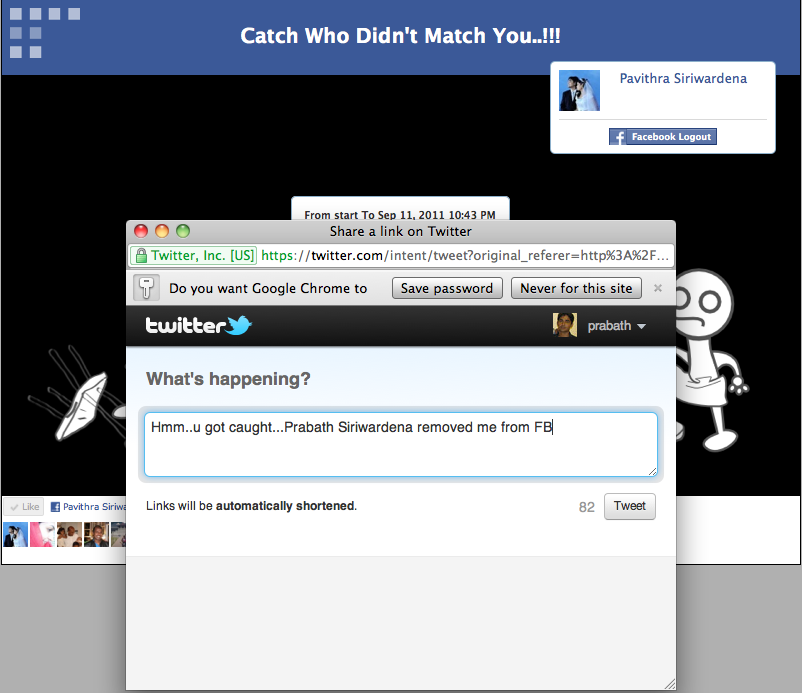
The "Catch Who Didn't Match You" application caters exactly that. Currently it's running on WSO2 StrtosLive PAAS and backed by a highly scalable cassandra NoSQL data store - available via http://tinyurl.com/stratos-unfriend.
Internal mailing lists getting busier and busier.. plenty of suggestions... thoughts... and ideas... everyone talking about making the WSO2Con an unique - unmatched experience.
This is not just the BIGGEST event WSO2 has ever organized, but the BIGGEST IT event in Sri Lanka..
WSO2Con happened to be an annual event since our 5th anniversary last year and this is the first time we've added 'international' flavor on it.
It's non-second to ApacheCon..
It's non-second to OSCON...
WSO2Con this year, features more than 30 experienced speakers around the world, from more than ten countries.
Dr. Mohan from IBM, Sastry Malladi from eBAy, Gregor Hohpe from Google are few to name among them.
Dr. C. Mohan has been an IBM researcher for 30 years in the information management area, impacting numerous IBM and non-IBM products, the research community and standards, especially with his invention of the ARIES family of locking and recovery algorithms, and the Presumed Abort commit protocol.
This IBM, ACM and IEEE Fellow has also served as the IBM India Chief Scientist. In addition to receiving the ACM SIGMOD Innovation Award, the VLDB 10 Year Best Paper Award and many IBM awards, he has been elected to the US and Indian National Academies of Engineering, and has been named an IBM Master Inventor. This distinguished alumnus of IIT Madras received his PhD at the University of Texas at Austin. He is an inventor of 36 patents. He serves on the advisory board of IEEE Spectrum and on the IBM Software Group Architecture Board’s Council.
Sastry is a technology evangelist with over 20 years of experience in architecting and building scalable distributed computing systems, in the areas of Application Servers, Java/J2EE/Web Services, SOA and Grid Computing. He is currently a Distinguished Architect at eBay, driving the SOA architecture and platform for the eBay ecommerce platform.
Prior to joining eBay, Sastry was Co-Founder and CTO of OpenGridSolutions, Founding member and Architect at SpikeSource, and an Architect at Oracle. Sastry also worked at many other companies in the early stages of his career and holds a Masters degree from I.I.T, Kharagpur, India. Sastry has presented at many conferences including JavaOne, Oracle World, SOA world and IONA world to name a few. He is a contributor to many standards at OMG, JCP, GGF and OASIS.
Gregor Hohpe is a Staff Software Engineer with Google. As a widely recognized thought leader on asynchronous messaging and service-oriented architectures. he co-authored the seminal book ‘Enterprise Integration Patterns’ (Addison-Wesley, 2004) and contributed to a variety of publications, including “97 Things Every Architect Should Know”. In 2005, Joel Spolsky selected Gregor’s article ‘Starbucks Does Not Use Two-phase Commit’ for his ‘Best Software Writing’. Find out more about his work at eaipatterns.com.
Doesn't this provide enough excitement to attend WSO2Con this year..? Here comes more.. :-)
It's in Sri Lanka - the 'small miracle' - surrounded with beautiful blue ocean, rich with enchanting natural beauty and smiles all-around from a nation renowned for great hospitality.
Also the biggest book fair in Sri Lanka, with hundreds of international publishers, will commence just after the WSO2Con - on 17th September - and will be within 5 kilometers from the conference center. This year it's the 13th Colombo International Book Fair and so far, every-time - this attracted crowds going beyond hundred thousands.
More news on WSO2Con to follow.. please keep tune in...
WSO2 Identity Server 3.2.0 release provides two types of extensions to it's XACML PIP. [The release is not yet done - you can download a build from the latest trunk from here]
1.PIP Extensions
Once the PIP Extensions got registered with the system - the registered PIP Extension will be invoked for each and every XACML request the PDP receives and this happens before the request been evaluated.
PIP Extensions can be used to modify the incoming request as well as log relavent parameters.
2.PIP Desiginators.
Once the PIP Desiginators got registered with the system - the registered Desiginators will be invoked while a request been evaluated in the PDP and need to find out the value of an attribute which is supported by the Desiginator. The Desiginator will let the system know the attributes it supports at the time of registration.
To register a PIP Extension or a PIP Designator we need to copy the jars with those classes to [CARBON_HOME]\repository\components\lib and create a file called pip-config.xml inside [CARBON_HOME]\repository\conf with the following. Here I assume the PIP Extension class name is org.wso2.carbon.identity.sample.pip.SamplePIPExtension and PIP Designator class name is org.wso2.carbon.identity.sample.pip.SamplePIPDesignator.
Also, in the above file, make sure that you keep the entry <Designator class="org.wso2.carbon.identity.entitlement.pip.DefaultAttributeFinder" /> as it is, because it's the default PIP Designator which will by default talk to the underlying user store.
Now, let's see how to write PIP Extensions and Designators. You need to have org.wso2.carbon.identity.entitlement-3.2.0.jar and sun-xacml-2.0.1.wso2v1.jar in the classpath. [You can find those jars inside [IS_HOME]\repository\components\plugins
package org.wso2.carbon.identity.sample.pip;

import java.util.HashSet;
import java.util.Set;

import org.wso2.carbon.identity.entitlement.pip.PIPAttributeFinder;

public class SamplePIPDesignator implements PIPAttributeFinder {

 @Override
 public Set getAttributeValues(String subjectId, String resourceId,
   String attributeId) throws Exception {
  Set attributeValues = new HashSet();
  attributeValues.add("myName");

  System.out.println("SamplePIPDesignator Called");
  System.out.println("SamplePIPDesignator SubjectId " + subjectId);
  System.out.println("SamplePIPDesignator AttributeId " + attributeId);
  System.out.println("SamplePIPDesignator Resource Id " + resourceId);

  return attributeValues;
 }

 @Override
 public Set getSupportedAttributes() {
  Set attributes = new HashSet();
  attributes.add("http://wso2.org/sample/claims/name");
  return attributes;
 }

}
package org.wso2.carbon.identity.sample.pip;

import org.wso2.carbon.identity.entitlement.pip.PIPExtension;

import com.sun.xacml.ctx.RequestCtx;

public class SamplePIPExtension implements PIPExtension{

 @Override
 public void update(RequestCtx request) {
  System.out.println("SamplePIPExtension Called");
 }

}
Notes :
1. The latest WSO2 Identity Server is running with the embedded ApacheDS LDAP server. The default port is 10389. If you want to change it, open CARBON_HOME\repository\conf\carbon.xml and look for LDAPServerPort and change it.
2. When you create or import a XACML policy to the Identity Server - policy will be in Disabled state - you need to Enable it by clicking the Enable link against the policy in the policy list page.
Properties are name value pairs. Properties are a way to convey information across different processing units. For example user may need to set a transport property from the message mediation. Or user may need to remove a property which is set by the transport. This mediator sets or removes properties for a particular message.
Property mediator has no direct impact on the message but rather on the message context flowing through Synapse. The properties set on a message can be later retrieved through the synapse:get-property(prop-name) XPath extension function. If a scope is specified for a property, the property could be set as a transport header property or an (underlying) Axis2 message context property, or as a Axis2 client option. If a scope is not specified, it will default to the Synapse message context scope. Using the property element with action specified as "remove" you can remove any existing message context properties.
The above extracted from the WSO2 ESB documentation...
This blog post focuses on different types of scopes available while setting properties.
1. Default - or the Synapse
Once you set a property under this scope - the value of it will be available through out both the in/out sequences.
To access this property inside the mediate() method of a mediator...
public boolean mediate(org.apache.synapse.MessageContext mc) {
// Available in both in-sequence and out-sequenc
String propValue = (String) mc.getProperty("PropName");
System.out.println("SCOPE_SYNAPSE : " + propValue);
return true;
}
2. Axis2
Once you set a property under this scope - the value of it will be available only through out the the sequence it's been set. If you set the Property mediator to the in-sequence, you cannot access it in the out-sequence.To access this property inside the mediate() method of a mediator...
public boolean mediate(org.apache.synapse.MessageContext mc) {
org.apache.axis2.context.MessageContext axis2MsgContext;
axis2MsgContext = ((Axis2MessageContext) mc).getAxis2MessageContext();

// Available only in the sequence the property is defined.
String propValue = (String) axis2MsgContext.getProperty("PropName");
System.out.println("SCOPE_AXIS2 : " + propValue);
return true;
}
3. Axis2-Client
This is similar to Synapse scope. The difference is - you can access it in following two ways..
I couldn't find this in the ESB property documentation - so thought of keeping a note here.
Also - there is a chance that you can confuse the constant "HTTP_METHOD" with org.apache.axis2.transport.http.HTTPConstants.HTTP_METHOD - which internally refers to ""HTTP_METHOD_OBJECT""
The default password is wso2carbon. You can put any name to alias [e.g. myservice] and need to replace public_cert.crt with name of the certificate you have from [1].
3.You may be using an IP address as the web service end point or the CN of the certificate issued for the end point may not match its server url. This could cause a host name verification error.
To overcome that, find the following in [ESB_HOME]/repository/conf/axis2.xml ..
4. If the Web Service or it's WSLD - or the both enabled for mutual authentication - you need export the public certificate of WSO2 ESB out and import it to the trust store of the Web Service.
To export out the ESB public certificate you can use the following.
Then you need to copy the MySQL DBC driver from http://dev.mysql.com/downloads/connector/j/5.1.html and Place it in the $IDENTITY_SERVER_HOME/repository/components/lib directory.
That's it - and start the identity server as sh bin/wso2server.sh -Dsetup
0. Set up the Active Directory as the KDC as in my previous blog post.
1. Download WSO2 ESB 3.0.1 from here unzip and apply the patches patch0003 and patch0023.These patches are not publicly available - but will be added in to the future releases. If you interested, please contact us on bizdev@wso2.com.
2. Create a file called krb.conf inside [ESB_HOME]\repository\conf and copy the following content to it.
Here, WSO2.COM is my root domain name of my Active Directory, which is acting as the KDC and 192.168.2.1 is it's IP address - so you need to change them as per your setup. Make sure that you have default_realm all caps.
3. Create a file called jaas.conf inside [ESB_HOME]\repository\conf and copy the following content to it.
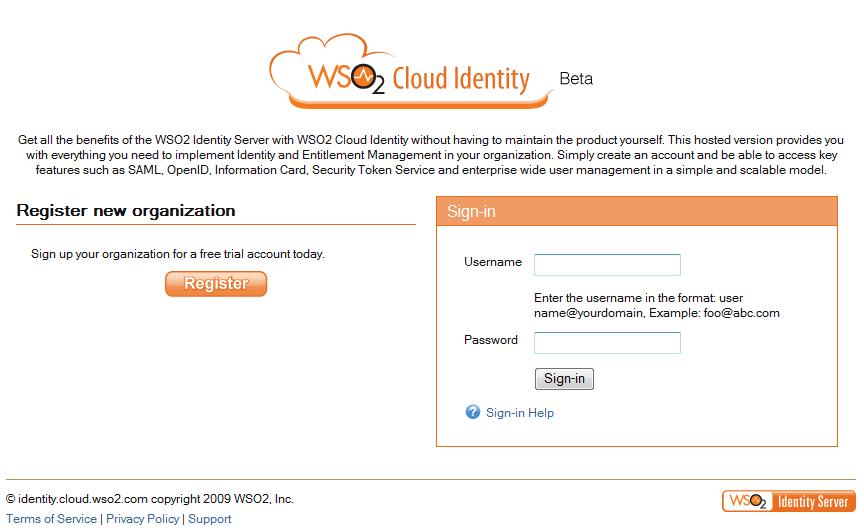
2. Clcik on 'Register' to register your organization.
3. Select a domain name for your organization.
4. At step-3, you can select, either to validate the domain or not to. If you select to confirm the domain later - then you can do it after login in and clicking Account Management tab.
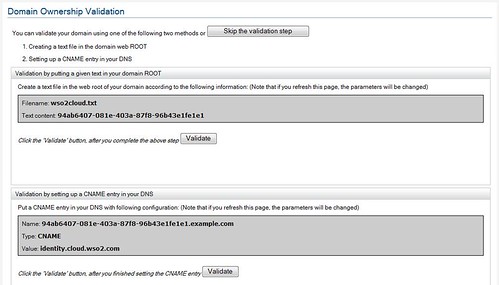
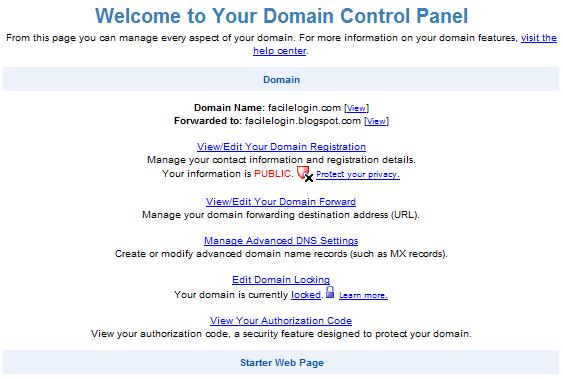
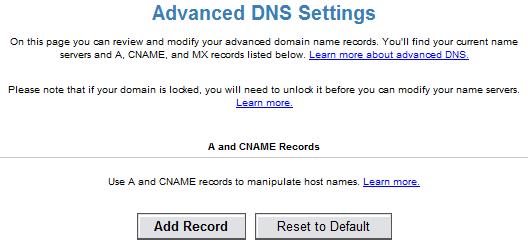
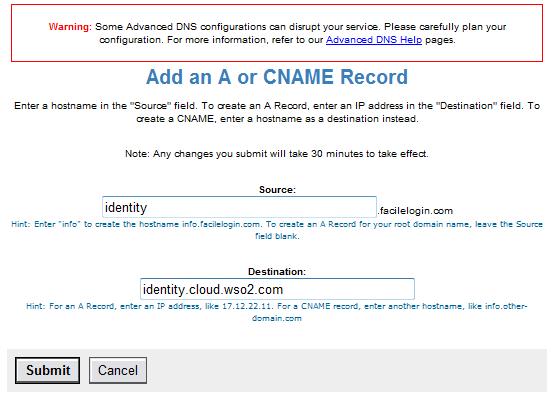
5. At step-3, if you select tp validate now, then you can do it either by uploading the given file to your domain or setting a CNAME. To see how to setup CNAME's please follow the corresponding documentations provided by your domain controller.
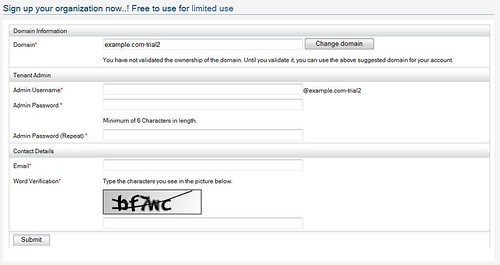
6. Fill account information. If you didn't validate your domain in step-3, you will notice that '-trial' being added to your domain name.
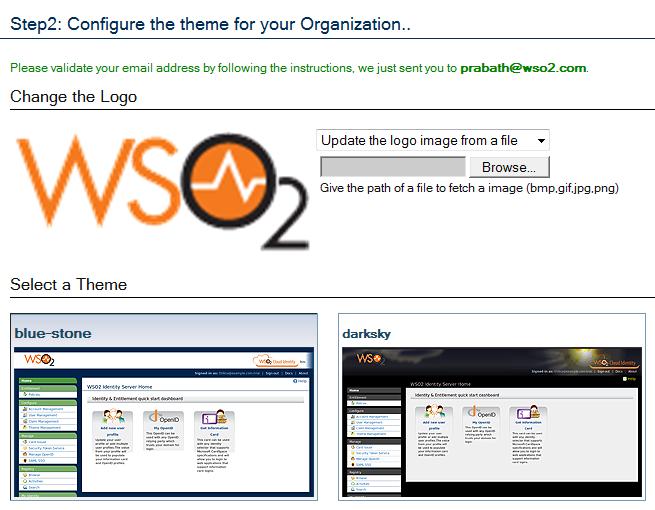
7. Select a theme for your organization.
8. Now you will get an email under the subject "WSO2 Cloud Identity - Registration confirmation" - click the link there to activate your account.
With WSO2 Cloud Identity - you can provide your employees OpenIDs fall under your own domain name to be used with widely popular OpenID relying parties.
Most enterprises start with creating basic services and connecting them with an Enterprise Service Bus when first adopting SOA. This session will talk about the wider usage of an ESB in SOA infrastructure and the decoupling of communication layers.
SOA Security
As many businesses move ahead with SOA, security and identity management need to be made available as a service in the architecture in a consistent and reusable way across all applications. This session will focus on implementing key security standards and identity management for SOA.
Mashups and Business Process Management for SOA
This session will introduce Mashups as an enterprise integration tool and will demonstrate the various technologies in use for service compositions in SOAs. Focusing on both automated processes and looking at how BPM fits into people-based processes, this session will also examine Open Standards for BPM, how the BPMN and BPEL standards fit together.
SOA Governance
Governance is a vital part of any SOA, and has an impact on runtime as well as design-time. Some major components of SOA governance include a registry, policy, monitoring and testing procedures. This session will discuss some predefined patterns and recommendations along with service life-cycles, resource life-cycles, metadata storage, policies and validations.
SOA with C, C++, PHP and more
As C, C++ and other such languages have been around for many years, it is predominant in legacy systems. This session will explore how These languages can be used to implement and integrate systems that use SOA principles to provide great business value to enterprise applications.
SOA Enterprise Architecture Patterns
This session will provide in-depth knowledge on how to implement an SOA solution using the basic elements in an SOA infrastructure discussed in other sessions.