Showing posts with label Kerberos. Show all posts

Invoking a WCF service secured with Kerberos via WSO2 ESB

1. Set up WCF service secured with Kerberos - explained in this blog post.

2. Set up the WSO2 ESB to work with Kerberos - explained in this blog post - follow the steps 0,1,2,3 and 4.

3. Create a resource in the WSO2 ESB - embedded registry with the following content - this is the security policy we will be applying to the out going messages from the ESB to the WCF service.

In this example, I created a Resource Collection called 'policies' under /_system/governance and created a Resource called krbpolicy with the following content under /_system/governance/policies.

So, my security policy from the registry is /_system/governance/policies/krbpolicy
<?xml version="1.0" encoding="UTF-8"?>
<wsp:Policy wsu:Id="kerberossignandencrypt"
 xmlns:wsp="http://schemas.xmlsoap.org/ws/2004/09/policy"
 xmlns:wsu="http://docs.oasis-open.org/wss/2004/01/oasis-200401-wss-wssecurity-utility-1.0.xsd">
 <wsp:ExactlyOne>
  <wsp:All>
   <sp:SymmetricBinding
    xmlns:sp="http://schemas.xmlsoap.org/ws/2005/07/securitypolicy">
    <wsp:Policy>
     <sp:ProtectionToken>
      <wsp:Policy>
       <sp:KerberosToken
        sp:IncludeToken="http://schemas.xmlsoap.org/ws/2005/07/securitypolicy/IncludeToken/AlwaysToRecipient">
        <wsp:Policy>
         <sp:WssKerberosV5ApReqToken11 />
        </wsp:Policy>
       </sp:KerberosToken>
      </wsp:Policy>
     </sp:ProtectionToken>
     <sp:AlgorithmSuite>
      <wsp:Policy>
       <sp:Basic256 />
      </wsp:Policy>
     </sp:AlgorithmSuite>
     <sp:Layout>
      <wsp:Policy>
       <sp:Lax />
      </wsp:Policy>
     </sp:Layout>
     <sp:IncludeTimestamp />
     <sp:OnlySignEntireHeadersAndBody />
    </wsp:Policy>
   </sp:SymmetricBinding>
   <sp:SignedParts
    xmlns:sp="http://schemas.xmlsoap.org/ws/2005/07/securitypolicy">
    <sp:Body />
   </sp:SignedParts>
   <sp:Wss11 xmlns:sp="http://schemas.xmlsoap.org/ws/2005/07/securitypolicy">
    <sp:Policy>
     <sp:MustSupportRefKeyIdentifier />
     <sp:MustSupportRefIssuerSerial />
     <sp:MustSupportRefThumbprint />
     <sp:RequireSignatureConfirmation />
    </sp:Policy>
   </sp:Wss11>
   <sp:Trust10 xmlns:sp="http://schemas.xmlsoap.org/ws/2005/07/securitypolicy">
    <wsp:Policy>
     <sp:RequireClientEntropy />
     <sp:RequireServerEntropy />
     <sp:MustSupportIssuedTokens />
    </wsp:Policy>
   </sp:Trust10>
   <rampart:RampartConfig xmlns:rampart="http://ws.apache.org/rampart/policy">
    <rampart:timestampPrecisionInMilliseconds>true
    </rampart:timestampPrecisionInMilliseconds>
    <rampart:timestampTTL>300</rampart:timestampTTL>
    <rampart:timestampMaxSkew>300</rampart:timestampMaxSkew>
    <rampart:kerberosConfig>
     <rampart:property name="client.principal.name">client</rampart:property>
     <rampart:property name="client.principal.password">1qaz2wsx$
     </rampart:property>
     <rampart:property name="service.principal.name">service/myserver@WSO2.COM
     </rampart:property>
     <rampart:property name="java.security.auth.login.config">jaas.conf
     </rampart:property>
     <rampart:property name="javax.security.auth.useSubjectCredsOnly">true</rampart:property>
     <rampart:property name="kdc.des.aes.factor">4</rampart:property>
     <rampart:property name="java.security.krb5.conf">/Users/prabath/clients/wso2esb-3.0.1/repository/conf/krb.conf
     </rampart:property>
    </rampart:kerberosConfig>
   </rampart:RampartConfig>
  </wsp:All>
 </wsp:ExactlyOne>
</wsp:Policy>
In the policy we have to set the absolute path to the krb.conf - at the same time we need to set the username and password of the client who invokes the WCF service appropriately - and this account should be in the Active Directory.

4. Now create a proxy service - and in the InSequence - in the Endpoint pointing to the WCF service, enable security and pick the security policy we set before, from the registry.

The endpoint configuration in the synapse config will look like,
<endpoint name="endpoint_urn_uuid_81768417D4430798591291451112900558002-585115135">
                <address uri="http://192.168.2.13/EchoServices/EchoService.svc">
                    <enableSec policy="gov:/policies/krbpolicy"/>
                </address>
</endpoint>
5. Also in the InSequence we need to add a Property mediator and set the following.
<property name="PRESERVE_WS_ADDRESSING" value="true"/>
6. Now in the OutSequence - we need to remove the Security Header coming from the WCF service before the Send mediator in the OutSequence - you can do it with a Header mediator.
<header xmlns:wsse="http://docs.oasis-open.org/wss/2004/01/oasis-200401-wss-wssecurity-secext-1.0.xsd" name="wsse:Security" action="remove"/>
7. Also in the OutSequence we need to add a Property mediator and set the following.
<property name="disableAddressingForOutMessages" value="true" scope="axis2"/>
These two properties [5 & 7] are needed if the back end service is WCF and it is secured using WS-Security and ESB is acting as a passthrough. When communicating with WCF, wsa:to should point to WCF service endpoint (In axis2, it can can point to some other place, still axis2 will dispatch correctly using URL). For the pass through with security case, client should sign wsa:headers (WS-Security requirement) and hence wsa:to cannot be changed by ESB (violation of signature); Hence, the requirement for "preserve addressing". When the response comes from WCF->ESB, ESB adds addressing header regardless of whether the original message (from WCF) has addressing or not. In above case, since wsa:headers of request is signed by client, response from WCF will contain a signed wsa headers. If ESB adds one more set of addressing headers, then it will be violating protocol. Hence the requirement for "disable addressing for out messages"

8. Now your InSquence will like,
<inSequence>
                <property name="PRESERVE_WS_ADDRESSING" value="true" scope="default" type="STRING"/>
            </inSequence>
9. OutSequence will look like,
<outSequence>
                <property name="disableAddressingForOutMessages" value="true" scope="axis2"/>
                <header xmlns:wsse="http://docs.oasis-open.org/wss/2004/01/oasis-200401-wss-wssecurity-secext-1.0.xsd" name="wsse:Security" action="remove"/>
                <send/>
            </outSequence>
10. That's it :)
Kerberos authentication with WSO2 ESB

0. Set up the Active Directory as the KDC as in my previous blog post.

1. Download WSO2 ESB 3.0.1 from here unzip and apply the patches patch0003 and patch0023.These patches are not publicly available - but will be added in to the future releases. If you interested, please contact us on bizdev@wso2.com.

2. Create a file called krb.conf inside [ESB_HOME]\repository\conf and copy the following content to it.
[libdefaults] 
        default_realm = WSO2.COM 
        default_tkt_enctypes = rc4-hmac 
        default_tgs_enctypes = rc4-hmac 
        dns_lookup_kdc = true 
        dns_lookup_realm = false 

[realms] 
        WSO2.COM = { 
            kdc = 192.168.2.10
   } 
Here, WSO2.COM is my root domain name of my Active Directory, which is acting as the KDC and 192.168.2.1 is it's IP address - so you need to change them as per your setup. Make sure that you have default_realm all caps.

3. Create a file called jaas.conf inside [ESB_HOME]\repository\conf and copy the following content to it.
Server {
com.sun.security.auth.module.Krb5LoginModule required
useKeyTab=tfalse
storeKey=true
useTicketCache=false
isInitiator=false;
};
Client {
com.sun.security.auth.module.Krb5LoginModule required
useTicketCache=false;
};
4. Start the WSO2 ESB

5. Apply security to the given proxy service [during this sample we select echo sample service which is already there by default]

6. Select 'Sign & Encrypt with Anonymous' from the Security Policy wizard.

7. After applying, edit the policy and replace both bindings with the content below.
<?xml version="1.0" encoding="UTF-8"?>
<wsp:Policy wsu:Id="kerberossignandencrypt"
  xmlns:wsp="http://schemas.xmlsoap.org/ws/2004/09/policy" xmlns:wsu="http://docs.oasis-open.org/wss/2004/01/oasis-200401-wss-wssecurity-utility-1.0.xsd">
  <wsp:ExactlyOne>
    <wsp:All>
      <sp:SymmetricBinding xmlns:sp="http://schemas.xmlsoap.org/ws/2005/07/securitypolicy">
        <wsp:Policy>
          <sp:ProtectionToken>
            <wsp:Policy>
              <sp:KerberosToken sp:IncludeToken="http://schemas.xmlsoap.org/ws/2005/07/securitypolicy/IncludeToken/AlwaysToRecipient">
                <wsp:Policy>
                  <sp:WssKerberosV5ApReqToken11/>
                </wsp:Policy>
              </sp:KerberosToken>
            </wsp:Policy>
          </sp:ProtectionToken>
          <sp:AlgorithmSuite>
            <wsp:Policy>
              <sp:Basic256/>
            </wsp:Policy>
          </sp:AlgorithmSuite>
          <sp:Layout>
            <wsp:Policy>
              <sp:Lax/>
            </wsp:Policy>
          </sp:Layout>
          <sp:IncludeTimestamp/>
          <sp:OnlySignEntireHeadersAndBody/>
        </wsp:Policy>
      </sp:SymmetricBinding>
      <sp:SignedParts xmlns:sp="http://schemas.xmlsoap.org/ws/2005/07/securitypolicy">
        <sp:Body/>
      </sp:SignedParts>
      <sp:Wss11 xmlns:sp="http://schemas.xmlsoap.org/ws/2005/07/securitypolicy">
        <sp:Policy>
          <sp:MustSupportRefKeyIdentifier/>
          <sp:MustSupportRefIssuerSerial/>
          <sp:MustSupportRefThumbprint/>
          <sp:RequireSignatureConfirmation/>
        </sp:Policy>
      </sp:Wss11>
      <sp:Trust10 xmlns:sp="http://schemas.xmlsoap.org/ws/2005/07/securitypolicy">
        <wsp:Policy>
          <sp:RequireClientEntropy/>
          <sp:RequireServerEntropy/>
          <sp:MustSupportIssuedTokens/>
        </wsp:Policy>
      </sp:Trust10>
      <rampart:RampartConfig xmlns:rampart="http://ws.apache.org/rampart/policy">
        <rampart:timestampPrecisionInMilliseconds>true</rampart:timestampPrecisionInMilliseconds>
        <rampart:timestampTTL>300</rampart:timestampTTL>
        <rampart:timestampMaxSkew>300</rampart:timestampMaxSkew>
        <rampart:kerberosConfig>
          <rampart:property name="service.principal.password">1qaz2wsx$</rampart:property>
          <rampart:property name="javax.security.auth.useSubjectCredsOnly">true</rampart:property>
          <rampart:property name="java.security.krb5.conf">/Users/prabath/clients/wso2esb-3.0.1/repository/conf/krb.conf</rampart:property> 
       </rampart:kerberosConfig>
      </rampart:RampartConfig>
    </wsp:All>
  </wsp:ExactlyOne>
</wsp:Policy>
You need to set your SPN password under service.principal.password and also the absolute path to krb.conf under java.security.krb5.conf.

8. You can write the Java client to this service as explained in my previous blog post.

Kerberos authentication with WCF Service and Java Client

1. Go through this previous post and get the WCF Service running properly with the Kerberos authentication.

2. Download the Kerberos java client Eclipse project from here - import it in to an Eclipse workspace and fix the missing references - all the jars available inside [WSO2_ESB_HOME]\repository\components\plugin. You can download WSO2 ESB 3.0.1 from here.

3. rampart-core, rampart-policy and wss4j should be picked from patch0003 and patch0023. These patches are not publicly available - but will be added in to the future releases. If you interested, please contact us on bizdev@wso2.com.

4.Make sure the Eclipse project compiles.

5. Configuration files

5.1. krb.conf
[libdefaults] 
        default_realm = WSO2.COM 
        default_tkt_enctypes = rc4-hmac 
        default_tgs_enctypes = rc4-hmac 
        dns_lookup_kdc = true 
        dns_lookup_realm = false 

[realms] 
        WSO2.COM = { 
            kdc = 192.168.2.10
   } 
Here, WSO2.COM is my root domain name of my Active Directory, which is acting as the KDC and 192.168.2.1 is it's IP address - so you need to change them as per your setup. Make sure that you have default_realm all caps.

5.2 jaas.conf
Client {
com.sun.security.auth.module.Krb5LoginModule required
useTicketCache=false;
};
You must have this Client section. Here we set useTicketCache=false; so our java client need not to be running from the same Windows domain as the KDC. If you set to true, you need to be in the same Windows domain as the KDC and also edit the Windows registry at the client end - my previous blog post explains how to do that - see #6.

5.3 policy-1.xml
<rampart:kerberosConfig>
     <rampart:property name="client.principal.name">client</rampart:property>
     <rampart:property name="client.principal.password">1qaz2wsx$
     </rampart:property>
     <rampart:property name="service.principal.name">service/myserver@WSO2.COM
     </rampart:property>
     <rampart:property name="java.security.auth.login.config">jaas.conf
     </rampart:property>
     <rampart:property name="javax.security.auth.useSubjectCredsOnly">true</rampart:property>
     <rampart:property name="kdc.des.aes.factor">4</rampart:property>
     <rampart:property name="java.security.krb5.conf">/Users/prabath/clients/org.wso2.identity.esb.kerberos/krb.conf
     </rampart:property>
    </rampart:kerberosConfig>
This is the security policy of the client and we have to set the path to jaas.conf and the absolute path to the krb.conf - at the same time we need to set the username and password of the client who invokes this - and this account should be in the Active Directory.

Also make a note of, service.principal.name - this is the SPN of the account where the Kerberos service is running under - we set this up in my previous blog post

6. In the KerberosCLient code set the RELYING_PARTY_SERVICE_EPR to you WCF Service EPR http://192.168.2.10/EchoServices/EchoService.svc

7. That's it :)

Kerberos authentication with WCF Service and WCF Client

1.Environment Setup

- Required Windows 2008 Server + IIS 7 + Active Directory + Visual Studio 2008

1.1 Active Directory

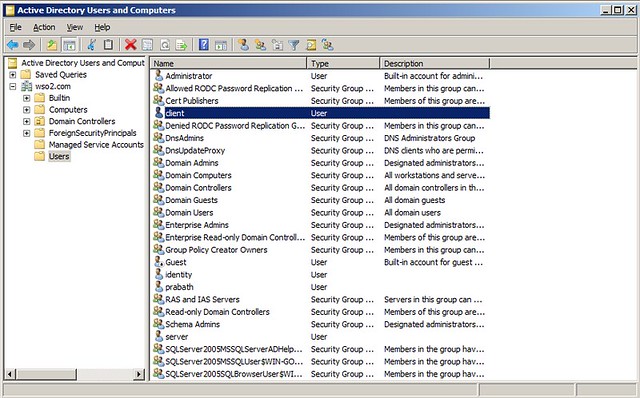
Following image shows my Active Directory configuration which includes two users server and client


Open up a command window and type the following to set the SPN for the user 'server'
:\> setspn -A service/myserver server

1.2 IIS

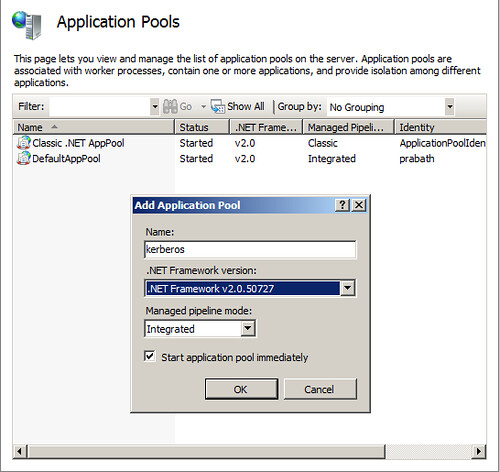
Open up IIS and create an application pool called 'kerberos'


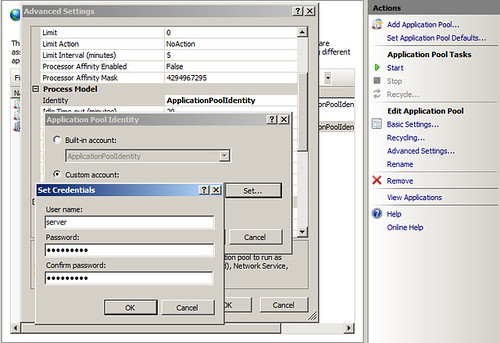
Then Edit the Advance Settings of the created application pool --> Select 'Identity' (under Process Model) --> Select 'Custom Account' --> set the user 'server' and his password


2.Sample Setup

2.1 Download the sample zip file from here, unzip and open it up in Visual Studio 2008

2.2 Find the following setting in web.config unser EchoService project and change it appropriately.. Here service/myserver is the SPN you create before for the user server.
<identity> 
<serviceprincipalname value="service/myserver" /> 
</identity> 
2.3 Build the entire solution

2.4 Deploy the service in IIS with the EchoService.WebSetup project

2.5 While doing 2.4, select the application pool created before in IIS - that is 'Kerberos'

2.6 Make sure the service running properly by accessing it's WSDL

http://localhost/EchoServices/EchoService.svc?wsdl

2.7 Open up the app.config file under EchoClient project and edit the following configuration appropriately..
<identity> 
<serviceprincipalname value="service/myserver" /> 
</identity> 
2.8 Correct the End Point address in app.config to point to the deployed service

That's it - now you can run the client from the IDE by setting it as the startup project.

Kerberos Debugging Tips

I worked on adding Kerberos support for Apache Rampart and WSS4J during last few weeks and interop testing with WCF.

Following lists some useful debugging tips I came across..

1. How to list all the Kerberos tickets issued to the logged in client principal in Windows
c:\Program Files (x86)\Resource Kit>klist

Current LogonId is 0:0x29a6f

Cached Tickets: (2)

#0>     Client: administrator @ WSO2.COM
        Server: krbtgt/WSO2.COM @ WSO2.COM
        KerbTicket Encryption Type: AES-256-CTS-HMAC-SHA1-96
        Ticket Flags 0x40e00000 -> forwardable renewable initial pre_authent
        Start Time: 11/25/2010 13:19:58 (local)
        End Time:   11/25/2010 23:19:58 (local)
        Renew Time: 12/2/2010 13:19:58 (local)
        Session Key Type: AES-256-CTS-HMAC-SHA1-96


#1>     Client: administrator @ WSO2.COM
        Server: service/myserver @ WSO2.COM
        KerbTicket Encryption Type: RSADSI RC4-HMAC(NT)
        Ticket Flags 0x40a40000 -> forwardable renewable pre_authent ok_as_delegate
        Start Time: 11/25/2010 13:19:58 (local)
        End Time:   11/25/2010 23:19:58 (local)
        Renew Time: 12/2/2010 13:19:58 (local)
        Session Key Type: RSADSI RC4-HMAC(NT)

2. How to remove cached Kerberos tickets in Windows
c:\Program Files (x86)\Resource Kit>klist purge

Current LogonId is 0:0x29a6f
        Deleting all tickets:
        Ticket(s) purged!

3. How to publish Kerberos error logs in to the Event Viewer in Windows

HKEY_LOCAL_MACHINE\SYSTEM\CurrentControlSet\Control\Lsa\Kerberos\Parameters
The Parameters subkey stores configuration options for the Kerberos V5 authentication protocol in Windows Server 2003/2008.

LogValue
Registry path
HKEY_LOCAL_MACHINE\SYSTEM\CurrentControlSet\Control\Lsa\Kerberos\Parameters

This entry does not exist in the registry by default. The default value is false - to publish to to Event Viewer set it to 1

Following are some more registry entries related to Kerberos...

AllowTgtSessionKey
Registry path
HKEY_LOCAL_MACHINE\SYSTEM\CurrentControlSet\Control\Lsa\Kerberos\Parameters

This entry controls whether session keys are exported with initial or cross-realm TGTs. This entry does not exist in the registry by default. The default value is false due to security concerns.

CacheS4UTickets
Registry path
HKEY_LOCAL_MACHINE\SYSTEM\CurrentControlSet\Control\Lsa\Kerberos\Parameters

This entry enables and disables Service-for-User (S4U) caching. This entry does not exist in the registry by default. The default value is true.

ClientIpAddresses
Registry path
HKEY_LOCAL_MACHINE\SYSTEM\CurrentControlSet\Control\Lsa\Kerberos\Parameters

This entry controls adding IP addresses in KRB_AS_REQ, thus forcing the Caddr field to contain IP addresses in all tickets. This entry does not exist in the registry by default. The default value is false, due to potential DHCP client and network address translation (NAT) issues.

DefaultEncryptionType
Registry path
HKEY_LOCAL_MACHINE\SYSTEM\CurrentControlSet\Control\Lsa\Kerberos\Parameters

This entry controls the default encryption type for PreAuth. This entry does not exist in the registry by default. The default value is KERB_ETYPE_RC4_HMAC_NT.

FarKdcTimeout
Registry path
HKEY_LOCAL_MACHINE\SYSTEM\CurrentControlSet\Control\Lsa\Kerberos\Parameters

This entry controls the time-out interval, in minutes, that is used to invalidate a domain controller from a different site in the domain controller cache. This entry does not exist in the registry by default. The default value is 10 minutes.

KdcBackoffTime
Registry path
HKEY_LOCAL_MACHINE\SYSTEM\CurrentControlSet\Control\Lsa\Kerberos\Parameters

This entry specifies a time value, in seconds, between successive calls to the Key Distribution Center (KDC) if the previous call failed. This entry does not exist in the registry by default. The default value is 5 seconds.

KdcSendRetries
Registry path
HKEY_LOCAL_MACHINE\SYSTEM\CurrentControlSet\Control\Lsa\Kerberos\Parameters

This entry controls the number of retry attempts that a client makes in order to contact a KDC. This entry does not exist in the registry by default. The default value is 3.

KdcWaitTime
Registry path
HKEY_LOCAL_MACHINE\SYSTEM\CurrentControlSet\Control\Lsa\Kerberos\Parameters

This entry specifies a time value, in seconds, that is used to time out the Winsock calls. This entry does not exist in the registry by default. The default value is 5 seconds.

KerbDebugLevel
Registry path
HKEY_LOCAL_MACHINE\SYSTEM\CurrentControlSet\Control\Lsa\Kerberos\Parameters

4. How to set a Service Principal Name [SPN] for a user in AD - in Windows
c:\Program Files (x86)\Resource Kit>setspn -A test/wso2 prabath
Registering ServicePrincipalNames for CN=prabath,CN=Users,DC=wso2,DC=com
        test/wso2
Updated object

5. How to list all the SPNs of a given user in AD - Windows
c:\Program Files (x86)\Resource Kit>setspn -L prabath
Registered ServicePrincipalNames for CN=prabath,CN=Users,DC=wso2,DC=com:
        test/wso2
        service/myserver

6. How to make java clients work with IWA

By default, Windows does not allow the session key of a TGT to be accessed. Add the following registry key on the client side, so that the session key for TGT is accessible and Java can use it to acquire additional service tickets.

For Windows XP and Windows 2000, the registry key and value should be:

HKEY_LOCAL_MACHINE\System\CurrentControlSet\Control\Lsa\Kerberos
Value Name: allowtgtsessionkey
Value Type: REG_DWORD
Value: 0x01

For Windows 2003 and Windows Vista, the registry key and value should be:

HKEY_LOCAL_MACHINE\System\CurrentControlSet\Control\Lsa\Kerberos\Parameters

Value Name: allowtgtsessionkey
Value Type: REG_DWORD
Value: 0x01